| Last Modified: 11-27-2007 | 1.6 D | |
| Service Category: Engine/Hybrid System | Section: Cruise Control | |
| Model Year: 2008 | Model: LX570 | Doc ID: RM000000ST0030X |
| Title: CRUISE CONTROL: DYNAMIC RADAR CRUISE CONTROL SYSTEM: ROAD TEST (2008 LX570) | ||
ROAD TEST
HINT:
The dynamic radar cruise control system has 2 cruise control modes: the constant speed control mode and vehicle-to-vehicle distance control mode.
- The vehicle-to-vehicle distance control mode is always selected when starting up the dynamic radar cruise control system.
- Operation of the constant speed control mode is the same as the cruise control system.
|
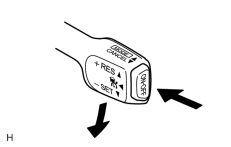
1. INSPECT SET SWITCH (a) Turn the cruise control main switch on. (b) Drive at the desired speed (40 km/h (25 mph) or higher). (c) Push the cruise control main switch to -SET (COAST/SET). (d) Check that the vehicle cruises at the desired speed. |
|
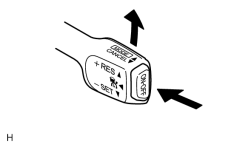
2. INSPECT "+" SWITCH (a) Turn the cruise control main switch on. (b) Drive at the desired speed (40 km/h (25 mph) or higher). (c) Push the cruise control main switch to -SET (COAST/SET). (d) Check that vehicle speed increases while the cruise control main switch is pushed to +RES (ACCELERATION/RESUME), and that the vehicle cruises at the set speed when released. (e) Vehicle-to-vehicle distance control mode: Momentarily push the cruise control main switch to +RES (ACCELERATION/RESUME), and then immediately release it. Check that the driving and the stored vehicle speed increase by 5 km/h or 5 mph (Tap-up function). HINT:
Pushing the cruise control main switch to +RES while following a vehicle in front with the vehicle-to-vehicle distance control mode on does not increase the actual vehicle speed, but changes only the stored vehicle speed. (f) Constant speed control mode: Momentarily push the control main switch to +RES (ACCELERATION/RESUME), and then immediately release it. Check that the vehicle speed increases by approximately 1.6 km/h (1.0 mph) (Tap-up function). |
|
|
3. INSPECT "-" SWITCH (a) Turn the cruise control main switch on. (b) Drive at the desired speed (40 km/h (25 mph) or higher). (c) Push the cruise control main switch to -SET (COAST/SET). (d) Check that vehicle speed decreases while the cruise control main switch is pushed to -SET (COAST/SET), and the vehicle cruises at the set speed when released. (e) Vehicle-to-vehicle distance control mode: Momentarily push the cruise control main switch to -SET (COAST/SET), and then immediately release it. Check that the driving and the stored vehicle speed decrease by 5 km/h or 5 mph (Tap-down function). (f) Constant speed control mode: Momentarily push the cruise control main switch to -SET (COAST/SET), and then immediately release it. Check that the vehicle speed decreases by approximately 1.6 km/h (1.0 mph) (Tap-down function). |
|
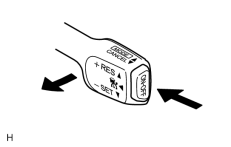
4. INSPECT CANCEL SWITCH (a) Turn the cruise control main switch on. (b) Drive at the desired speed (40 km/h (25 mph) or higher). (c) Push the cruise control main switch to -SET (COAST/SET). (d) When performing one of the following, check that the cruise control system is canceled.
|
|
|
5. INSPECT RES (RESUME) SWITCH (a) Turn the cruise control main switch on. (b) Drive at the desired speed (40 km/h (25 mph) or higher). (c) Push the cruise control main switch to -SET (COAST/SET). (d) Cancel the cruise control system by performing any of the operations below.
(e) After the cruise control main switch is pushed to +RES (ACCELERATION/RESUME) at a driving speed of more than 40 km/h (25 mph), check that the vehicle restores the speed before the cancellation. |

|

|