| Last Modified: 11-27-2007 | 1.6 D | |
| Service Category: Steering | Section: Steering Column | |
| Model Year: 2008 | Model: LX570 | Doc ID: RM000000XOA00KX |
| Title: VARIABLE GEAR RATIO STEERING: VARIABLE GEAR RATIO STEERING SYSTEM: CALIBRATION (2008 LX570) | ||
CALIBRATION
NOTICE:
Use this procedure to center the steering wheel if:
- The steering actuator assembly has been replaced.
- The steering control ECU has been replaced.
- The steering column or steering intermediate shaft has been disconnected.
- The steering wheel is still off-center after completing the steering angle sensor initialization.
1. VGRS SYSTEM CALIBRATION PROCEDURE (WHEN USING SST CHECK WIRE)
|
1. |
FACE TIRES STRAIGHT AHEAD |
NOTICE:
Drive the vehicle to confirm that the steering wheel is centered.
|

|
2. |
CHECK DTC |
(a) Check for DTCs
 .
.
Result
|
Result |
Proceed to |
|---|---|
|
DTC C1591/51 is not output |
A |
|
DTC C1591/51 is output |
B |
| B |

|
Go to step 4 |
|
|
3. |
PERFORM ACTUATOR ANGLE INITIALIZATION |
SST: 09843-18040
NOTICE:
If the procedures from *1 to *2 are not completed within 1 minute, or if errors are made during these procedures, perform the initialization again from the beginning.
|
(a) Start the engine. |
(b) Center the steering wheel.
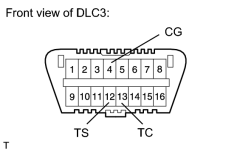
(c) Using SST, connect terminals 12 (TS) and 4 (CG), and 13 (TC) and 4 (CG) of the DLC3.*1
(d) Disconnect SST from terminal 12 (TS) of the DLC3, and turn the steering wheel to the left 180° or more.
(e) Connect SST to terminal 12 (TS) of the DLC3.
(f) Disconnect SST from terminal 13 (TC) of the DLC3, and turn the steering wheel to the right 180° or more.
(g) Connect SST to terminal 13 (TC) of the DLC3.*2
HINT:
If the master warning light comes on, DTC C1591/51 is stored.
(h) Disconnect SST from the DLC3.
(i) Turn the engine switch off.
|
|
4. |
FACE TIRES STRAIGHT AHEAD |
(a) Confirm that the steering wheel is centered when facing the tires straight ahead.
NOTICE:
Drive the vehicle to confirm that the steering wheel is centered.
Result
|
Result |
Proceed to |
|---|---|
|
Steering wheel is off-center |
A |
|
Steering wheel is centered |
B |
| B |
|
Go to step 8 |
|
|
5. |
UNLOCK STEERING ACTUATOR |
NOTICE:
Make sure the engine is not running.
(a) Turn the engine switch off.
(b) Disconnect the cable from the negative (-) battery terminal.
w/ Navigation system
NOTICE:
After the engine switch is turned off, the HDD navigation system requires approximately 6 minutes to record various types of memory and settings. As a result, after turning the engine switch off, wait 6 minutes or more before disconnecting the cable from the negative (-) battery terminal.
|
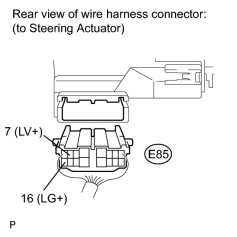
(c) Disconnect the E85 connector from the steering actuator. |
(d) Connect a jumper wire from terminal 7 (LV+) of the steering actuator to the positive (+) 12 V battery terminal and another jumper wire from terminal 16 (LG+) of the steering actuator to the negative (-) 12 V battery terminal.
NOTICE:
Do not apply voltage for more than 3 minutes.
|
|
6. |
STEERING CENTER ADJUSTMENT |
(a) Center the steering wheel.
NOTICE:
If the centering of the spiral cable was not confirmed when the steering wheel was installed, confirm the centering of the spiral cable
.
|
|
7. |
LOCK STEERING ACTUATOR |
(a) Disconnect the positive (+) and negative (-) 12 V battery jumper wires from the steering actuator.
(b) Connect the E85 connector to the steering actuator.
(c) Connect the cable to the negative (-) battery terminal.
(d) Turn the steering wheel approximately 3° to the left and right. Confirm that the reaction force can be felt.
NOTICE:
- If the above procedures are not followed correctly, a DTC will be stored. If a DTC is stored, perform the above procedures again and then check for DTCs.
- Perform these procedures with the engine switch off.
|
|
8. |
ADJUST ACTUATOR ANGLE |
HINT:
Activating and ending test mode will complete actuator angle adjustment.
(a) Make sure the engine switch is off.
NOTICE:
Do not touch the steering wheel during these procedures.
|
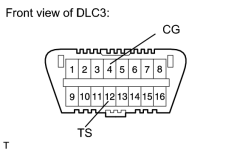
(b) Using SST, connect terminals 12 (TS) and 4 (CG) of the DLC3. |
SST: 09843-18040
(c) Turn the engine switch on (IG).
(d) Confirm that "VGRS Test Mode" is displayed on the multi-information display when test mode is activated.
HINT:
Wait approximately 5 seconds.
(e) Turn the engine switch off.
(f) Disconnect SST from terminals 12 (TS) and 4 (CG) of the DLC3.
(g) Turn the engine switch on (IG) again.
|
|
9. |
CHECK MASTER WARNING LIGHT |
(a) Confirm that the master warning light is off.
(b) Turn the engine switch off, then on (IG).
(c) Confirm that the master warning light is operating normally.
|
|
10. |
CHECK STEERING WHEEL OPERATION |
(a) Start the engine.
(b) Perform the steering angle sensor initialization
.
(c) Turn the steering wheel from lock to lock and check that it rotates approximately 2.7 turns.
(d) Drive the vehicle and confirm that the steering wheel is centered.
| NEXT |
|
END |
2. VGRS SYSTEM CALIBRATION PROCEDURE (WHEN USING TECHSTREAM)
|
1. |
FACE TIRES STRAIGHT AHEAD |
NOTICE:
Drive the vehicle to confirm that the steering wheel is centered.
|
|
2. |
PERFORM VGRS SYSTEM CALIBRATION |
(a) Connect the Techstream to the DLC3.
(b) Turn the engine switch on (IG).
(c) Turn the Techstream on.
(d) Enter the following menus: Chassis / VGRS / Utility / Steering Angle Adjust.
(e) Perform the following procedures displayed on the Techstream.
HINT:
Refer to the Techstream operator's manual for further details.
|
|
3. |
CHECK MASTER WARNING LIGHT |
(a) Confirm that the master warning light is off.
(b) Turn the engine switch off.
(c) Disconnect the Techstream from the DLC3.
(d) Turn the engine switch on (IG).
(e) Confirm that the master warning light is operating normally.
|
|
4. |
CHECK STEERING WHEEL OPERATION |
(a) Start the engine.
(b) Perform the steering angle sensor initialization
.
(c) Turn the steering wheel from lock to lock and check that it rotates approximately 2.7 turns.
(d) Drive the vehicle and confirm that the steering wheel is centered.
| NEXT |
|
END |

|

|