| Last Modified: 11-27-2007 | 1.6 J | |
| Service Category: Audio/Visual/Telematics | Section: Audio/Video | |
| Model Year: 2008 | Model: LX570 | Doc ID: RM00000102W01JX |
| Title: AUDIO / VIDEO: AUDIO AND VISUAL SYSTEM: INSPECTION PROCEDURE (2008 LX570) | ||
|
Radio Broadcast cannot be Received (Bad Reception) |
INSPECTION PROCEDURE
PROCEDURE
|
1. |
CHECK IF RADIO AUTO-SEARCH FUNCTIONS PROPERLY |
(a) Perform the auto-search of the radio and check that it functions normally.
OK:
Radio auto-search functions normally.
|

|
2. |
CHECK OPTIONAL COMPONENTS |
(a) Check if a telephone antenna or other optional components are installed.
OK:
Optional component(s) is installed.
|
|
3. |
CHECK ANTENNA FOR NOISE PRODUCTION |
(a) With the engine switch on (ACC), turn on the radio and choose the AM mode.
(b) Place the tip of a screwdriver on the antenna and check that noise is heard from the speakers.
OK:
Noise is heard.
|
|
4. |
CHECK RADIO RECEIVER ASSEMBLY (ANTENNA) |
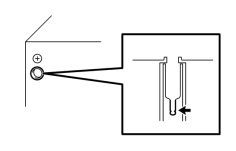
|
(a) Remove the antenna plug of the radio receiver. |
(b) With the radio receiver connector connected, turn the engine switch on (ACC).
(c) Turn on the radio and choose the AM mode.
(d) Place a flat-head screwdriver or a piece of metal, such as a thin wire, on the antenna jack of the radio receiver. Check that noise is heard from the speakers.
OK:
Noise is heard.
|

|

|