| Last Modified: 11-27-2007 | 1.6 J | |
| Service Category: Audio/Visual/Telematics | Section: Audio/Video | |
| Model Year: 2008 | Model: LX570 | Doc ID: RM00000103702BX |
| Title: AUDIO / VIDEO: AUDIO AND VISUAL SYSTEM: INSPECTION PROCEDURE (2008 LX570) | ||
|
No Sound can be Heard from Speakers |
INSPECTION PROCEDURE
PROCEDURE
|
1. |
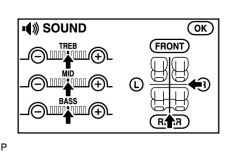
CHECK SOUND SETTING |
|
(a) Enter the sound adjustment screen by pressing the "SOUND" switch on the AUDIO display. |
(b) Set volume, fader, and balance to the initial values and check that the sound is normal.
OK:
Sound returns to normal.
HINT:
Sound quality adjustment items vary depending on the type of the amplifier.
|


|

|