| Last Modified: 11-27-2007 | 1.6 D | |
| Service Category: Vehicle Interior | Section: Supplemental Restraint Systems | |
| Model Year: 2008 | Model: LX570 | Doc ID: RM0000010VN02YX |
| Title: SUPPLEMENTAL RESTRAINT SYSTEMS: OCCUPANT CLASSIFICATION SYSTEM: INITIALIZATION (2008 LX570) | ||
INITIALIZATION
NOTICE:
Make sure that the front passenger seat is not occupied before performing the operation.
HINT:
Perform zero point calibration if any of the following conditions is met:
- The No. 1 seat cushion (occupant classification ECU) is replaced.
- The passenger airbag ON/OFF indicator indicates ("OFF") when the front passenger seat is not occupied.
- The vehicle is brought to the workshop for repair due to an accident or a collision.
1. ZERO POINT CALIBRATION
(a) Zero point calibration procedures
(1) Check that all of the following conditions are met:
- The vehicle is parked on a level surface.
- No objects are placed on the front passenger seat.
- The front passenger seat belt buckle switch is off.
(2) Adjust the seat position according to the table below.
|
Adjustment Item |
Position |
|---|---|
|
Slide Direction |
Rear most position |
|
Reclining Angle |
Upright position |
|
Front vertical Height |
Upper most position |
|
Lifter Height |
Lower most position |
(3) Connect the Techstream to the DLC3.
(4) Turn the engine switch on (IG).
(5) Perform zero point calibration by following the prompts on the Techstream screen.
HINT:
- Refer to the Techstream operator's manual for further details.
- If the zero point calibration is performed when the calibration conditions are not satisfied, DTC B1797 is output.
- If the zero point calibration has failed, DTC B1797 is output.
-
If After Exchange is selected before the previous ECU data are stored in the Techstream, the display screen returns to System Select: Body Electrical / Occupant Detection.
OK:
"Zero Point Calibration is complete" is displayed.
|
Item |
Procedure |
|---|---|
|
DTC |
Check for DTCs and perform troubleshooting |
|
Write error |
Replace No. 1 seat cushion (occupant classification ECU and occupant detection sensor) |
|
Temperature |
Check value of Thermistor temperature output in Data List |
|
Pressure |
Check value of Filtered pressure sensor output in Data List |
|
Crash counter |
- |
2. SENSITIVITY CHECK
(a) Sensitivity check procedures
(1) Turn the engine switch off.
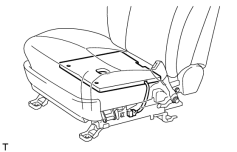
|
(2) Place a weight of 20 kg (44.0 lb) on the front passenger seat. NOTICE:
|
(3) Turn the engine switch on (IG), and wait for at least 6 seconds.
(4) Check that the passenger airbag ON/OFF indicator indicates ("OFF").
OK:
Passenger airbag ON/OFF indicator indicates ("OFF").
(5) Add a weight of 30 kg (66.1 lb) to the front passenger seat (total 50 kg (110.2 lb)).
NOTICE:
Do not allow the weight to come into contact with the seatback when placing it on the seat cushion.
(6) Check that the passenger airbag ON/OFF indicator indicates ("ON").
OK:
Passenger airbag ON/OFF indicator indicates ("ON").

|

|