| Last Modified: 11-27-2007 | 1.6 A | |
| Service Category: Power Source/Network | Section: Battery/Charging | |
| Model Year: 2008 | Model: LX570 | Doc ID: RM00000189100XX |
| Title: 3UR-FE BATTERY / CHARGING: GENERATOR: REASSEMBLY (2008 LX570) | ||
REASSEMBLY
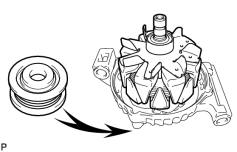
1. INSTALL GENERATOR ROTOR ASSEMBLY
|
(a) Place the drive end frame on the pulley. |
(b) Install the rotor to the drive end frame.
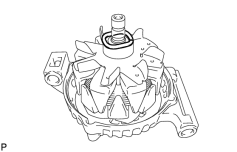
2. INSTALL GENERATOR COIL ASSEMBLY
|
(a) Place the generator washer on the rotor. |
|
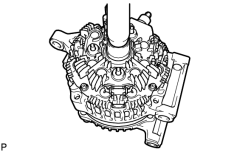
(b) Using a 21 mm socket wrench and a press, slowly press in the coil assembly. |
|
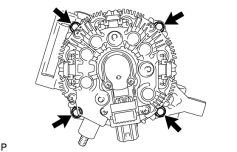
(c) Install the 4 bolts. Torque: 7.5 N·m (76 kgf·cm, 66 in·lbf) |
3. INSTALL GENERATOR BRUSH HOLDER ASSEMBLY
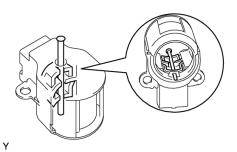
|
(a) While pushing the 2 brushes toward the inside of the brush holder, insert a pin (diameter: 1.0 mm (0.0394 in.)) into the brush holder hole. |
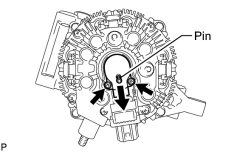
|
(b) Install the generator brush holder with the 2 screws. Torque: 1.8 N·m (18 kgf·cm, 16 in·lbf) |
(c) Pull out the pin from the generator brush holder.
4. INSTALL GENERATOR REAR END COVER
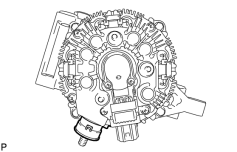
|
(a) Install the terminal insulator to the generator rectifier end frame. NOTICE:
Pay attention to the mounting orientation of the terminal insulator. |
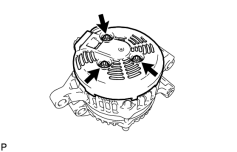
|
(b) Install the end cover with the 3 nuts. Torque: 4.6 N·m (46 kgf·cm, 40 in·lbf) |
5. INSTALL GENERATOR PULLEY
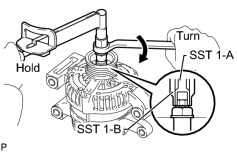
SST: 09820-63011
09820-06010
09820-06021
|
SST 1-A and B |
09820-06010 |
|
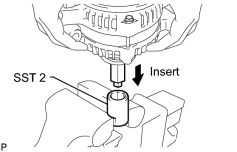
SST 2 |
09820-06021 |
(a) Install the pulley onto the rotor shaft by tightening the pulley nut by hand.
(b) Hold SST 1-A with a torque wrench, and tighten SST 1-B clockwise to the specified torque.
Torque: 39 N·m (398 kgf·cm, 29 ft·lbf)
NOTICE:
Check that SST is secured to the rotor shaft.
|
(c) Mount SST 2 in a vise. |
(d) Insert SST 1-A and B into SST 2, and attach the pulley nut to SST 2.
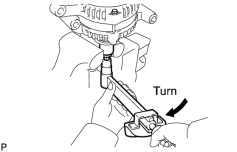
|
(e) Tighten the pulley nut by turning SST 1-A in the direction shown in the illustration. Torque: 133 N·m (1351 kgf·cm, 98 ft·lbf) |
(f) Remove the generator from SST 2.
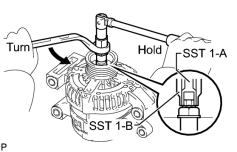
|
(g) Turn SST 1-B, and remove SST 1-A and B. |
(h) Turn the pulley and check that the pulley moves smoothly.

|

|