| Last Modified: 11-27-2007 | 1.6 G | |
| Service Category: Suspension | Section: Suspension Control System | |
| Model Year: 2008 | Model: LX570 | Doc ID: RM000001DW8006X |
| Title: SUSPENSION CONTROL: ACTIVE HEIGHT CONTROL SUSPENSION: ON-VEHICLE INSPECTION (2008 LX570) | ||
ON-VEHICLE INSPECTION
1. OPERATE HEIGHT CONTROL SWITCH AND CHECK CHANGE OF VEHICLE HEIGHT
NOTICE:
- Perform the inspection with the vehicle empty.
- When operating the height control switch, operate the switch with the driver door opened, and then close the driver door after getting out of the vehicle.
HINT:
Vehicle height control starts just after closing the door.
(a) Set the tires to the specified tire pressure, and adjust all 4 wheels.
(b) For the front side, measure the ground clearance of the front adjusting cam bolt center.
For the rear side, measure the ground clearance of the rear lower control arm front side center.
HINT:
Refer to the following for the measurements
 .
.
(c) Start the engine.
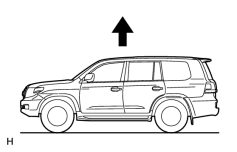
|
(d) Push the height control switch to change from "N" to "HI" mode. |
(e) Check the time required for the height change and the changed amount of the vehicle height.
Standard Value:
|
Vehicle Condition |
Fluid Temperature Condition |
Reference Value |
|---|---|---|
|
"HI" mode (Up time) |
20°C (68°F) +/- 10°C (50°F) |
Approximately 15 seconds |
Amount of Change in Vehicle Height:
|
Item |
Specified Condition |
|---|---|
|
Front |
Approximately +50 mm (+1.97 in.) |
|
Rear |
Approximately +60 mm (+2.36 in.) |
NOTICE:
After vehicle height control has been completed, wait for approximately 20 seconds until the height is fixed securely, then check the changed amount of vehicle height.
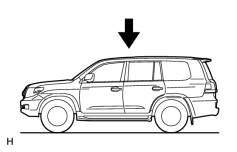
|
(f) Push the height control switch to change from "N" to "LO" mode. |
(g) Check the time required for the height change and the changed amount of the vehicle height.
Standard Value:
|
Vehicle Condition |
Fluid Temperature Condition |
Reference Value |
|---|---|---|
|
"LO" mode (Down time) |
20°C (68°F) +/- 10°C (50°F) |
Approximately 10 seconds |
Amount of Change in Vehicle Height:
|
Item |
Specified Condition |
|---|---|
|
Front |
Approximately -60 mm (-2.36 in.) |
|
Rear |
Approximately -40 mm (-1.57 in.) |
NOTICE:
After vehicle height control has been completed, wait for approximately 20 seconds until the height is fixed securely, then check the changed amount of vehicle height.
2. INSPECT FLUID PRESSURE
NOTICE:
With the vehicle empty, perform this inspection with 1 person sitting in the driver seat in order to confirm that the switch operation and vehicle height change have been completed.
HINT:
The average weight for one person is about 68 kg (149.9 lb).
(a) Turn the engine switch off.
(b) Connect the Techstream to the DLC3.
(c) Start the engine and turn the Techstream on.
(d) Press the UP button of the height control switch. Using the Data List, check the oil pressure when the vehicle height changes from NORMAL to HI.
AHC
|
Tester Display |
Measurement Item/Range |
Normal Condition |
Diagnostic Note |
|---|---|---|---|
|
Oil Pressure Sensor |
Fluid pressure sensor reading / min.: -784.79 MPa (-8002.66 kgf/cm2, -113794.55 psi) max.: 784.76 MPa (8002.354 kgf/cm2, 113790.2 psi) |
- |
- |
Standard Pressure:
|
Vehicle Condition |
Fluid Temperature Condition |
Reference Value |
|---|---|---|
|
When vehicle height changes from NORMAL to HI |
20°C (68°F) +/-10°C (50°F) |
The oil pressure begins rising when control is started and reaches approximately 13 MPa (132.6 kfg/cm2, 1885 psi) when the vehicle height is almost finished changing to HI. |
(e) Set the vehicle height to LO and press the UP button of the height control switch. Then check the oil pressure when the vehicle height changes from LO to NORMAL.
Standard Pressure:
|
Vehicle Condition |
Fluid Temperature Condition |
Reference Value |
|---|---|---|
|
When vehicle height changes from LO to NORMAL |
20°C (68°F) +/-10°C (50°F) |
The oil pressure begins rising when control is started and reaches approximately 8 MPa (81.6 kfg/cm2, 1160 psi) when the vehicle height is almost finished changing to NORMAL. |
3. INSPECT VEHICLE SPEED SENSING FUNCTION
HINT:
When the vehicle speed sensing function control operates, nothing displays on the indicator in the combination meter.
(a) Turn the engine switch off.
(b) Connect the Techstream to the DLC3.
(c) Turn the engine switch on (IG) and the Techstream on.
(d) Using the Data List, check the vehicle speed sensing function.
AHC
|
Tester Display |
Measurement Item/Range |
Normal Condition |
Diagnostic Note |
|---|---|---|---|
|
Height Mode |
Height mode / NORMAL / ACCE LO / LO / STAN LO / FAST LO / L4 HI / HI / EX HI |
Actual conditions are displayed |
- |
(e) When the transfer is in the L4 position:
(1) When the vehicle is driven at a speed of approximately 3 km/h (2 mph) or more, check that the vehicle height changes to HI using the Data List.
OK:
The display changes to HI.
(2) Using the Data List, check if the vehicle height changes from HI to L4 HI when the vehicle speed is 40 km/h (25 mph) or more.
OK:
The display changes to L4 HI.
(f) When driving at a high speed:
(1) Using the Data List, check that the vehicle height lowers when the vehicle height is NORMAL and the vehicle speed is 100 km/h (62 mph) or more.
OK:
The display changes to FAST LO.
(2) Using the Data List, check that the vehicle height returns to NORMAL when the vehicle speed is reduced to less than 80 km/h (50 mph).
OK:
The display changes to NORMAL.
(g) Easy access mode control:
Using the Data List, check that the vehicle height changes to ACCE LO when the engine switch is turned off with the engine running, the vehicle height NORMAL, easy access mode on and the shift lever in P.
OK:
The display changes to ACCE LO.
(h) When vehicle height control is prohibited:
(1) Press the height control OFF switch to prohibit vehicle height control.
(2) Drive the vehicle at 80 km/h (50 mph) or more with the vehicle height NORMAL, or drive the vehicle at 30 km/h (19 mph) or more with the vehicle height not NORMAL and, using the Data List, check that vehicle height control prohibition is canceled.
AHC
|
Tester Display |
Measurement Item/Range |
Normal Condition |
Diagnostic Note |
|---|---|---|---|
|
Height Control Prohibition |
Vehicle height control prohibition information/ Permiss or Prohibi |
Actual conditions are displayed |
- |
OK:
The display changes from Prohibi to Permiss.

|

|