| Last Modified: 11-27-2007 | 1.6 J | |
| Service Category: Audio/Visual/Telematics | Section: Audio/Video | |
| Model Year: 2008 | Model: LX570 | Doc ID: RM00000294I00GX |
| Title: AUDIO / VIDEO: AUDIO AND VISUAL SYSTEM: INSPECTION PROCEDURE (2008 LX570) | ||
|
CD/DVD Sound Skips |
INSPECTION PROCEDURE
PROCEDURE
|
1. |
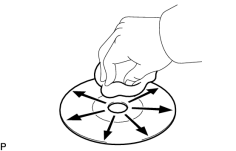
CLEAN DISC |
|
(a) Clean the disc by wiping the disc underside radially with a soft cloth. OK: Malfunction disappears. NOTICE:
Do not use a conventional record cleaner or antistatic preservative. |
|

|
2. |
REPLACE DISC WITH ANOTHER AND RECHECK |
(a) Replace the disc with a normal one and check if the same problem occurs again.
OK:
Malfunction disappears.
|
|
3. |
CHECK WHEN PROBLEM OCCURS |
(a) Check the location in which disc skipping occurs.
Result
|
Result |
Proceed to |
|---|---|
|
Driving surface is bumpy or rough |
A |
|
Driving surface is normal |
B |
|
|
4. |
CHECK RADIO RECEIVER INSTALLATION |
(a) Check the installation condition of the radio receiver.
OK:
Installed properly.
|
|
5. |
INSTALL RADIO RECEIVER IN ANOTHER VEHICLE OF SAME MODEL AND COMPARE |
(a) Remove the radio receiver and install it in another vehicle of the same model. Check if the disc sound skips.
OK:
Disc sound does not skip.
|
|
6. |
DID TEMPERATURE IN CABIN CHANGE RAPIDLY? |
(a) Check whether or not a rapid temperature change occurred in the cabin.
OK:
Rapid temperature change occurred.
HINT:
A rapid temperature change creates condensation inside the disc player, which may disable disc playback.
|

|

|