| Last Modified: 11-27-2007 | 1.6 J | |
| Service Category: Vehicle Interior | Section: Door Lock | |
| Model Year: 2008 | Model: LX570 | Doc ID: RM000002AGP00DX |
| Title: DOOR LOCK: WIRELESS DOOR LOCK CONTROL SYSTEM: DESCRIPTION (2008 LX570) | ||
|
No Answer-Back |
DESCRIPTION
In some cases, wireless door lock control functions are normal but the turn signal lights and wireless door lock buzzer are not. Malfunctions may be present in the main body ECU (cowl side junction block LH), certification ECU (smart key ECU assembly), turn signal lights, and/or wireless door lock buzzer signal outputs.
NOTICE:
- Before performing the inspection, check that there are no problems related to the CAN communication system and LIN communication system.
- When troubleshooting a function, first make sure that the answer-back function is set to the default setting.
- Check that DTC B1242 is not output.
- When troubleshooting a function, first make sure that the open door warning function is set to the default setting.
WIRING DIAGRAM
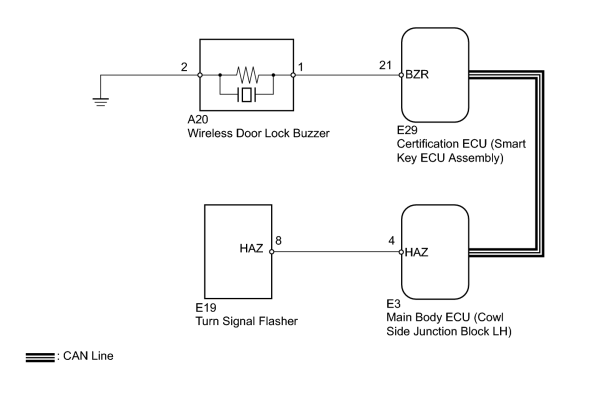
INSPECTION PROCEDURE
PROCEDURE
|
1. |
CHECK WIRELESS DOOR LOCK FUNCTION |
(a) Check that the wireless door lock control functions operate with a transmitter
 .
.
Result
|
Result |
Proceed to |
|---|---|
|
Wireless door lock control functions operate normally but turn signal light answer-back does not occur |
A |
|
Wireless door lock control functions operate normally but wireless door lock buzzer answer-back does not occur |
B |
|

|
2. |
CHECK HAZARD WARNING LIGHT |
(a) Check that the turn signal lights flash continuously when the hazard warning signal switch is pressed.
OK:
Hazard warning lights flash continuously.
|
|
3. |
CHECK HARNESS AND CONNECTOR (WIRELESS DOOR LOCK BUZZER - CERTIFICATION ECU AND BODY GROUND) |
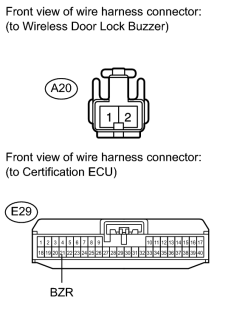
(a) Disconnect the E29 ECU connector.
(b) Disconnect the A20 buzzer connector.
(c) Measure the resistance according to the value(s) in the table below.
Standard Resistance:
|
Tester Connection |
Condition |
Specified Condition |
|---|---|---|
|
A20-1 - E29-21 (BZR) |
Always |
Below 1 Ω |
|
A20-2 - Body ground |
||
|
A20-1 - Body ground |
Always |
10 kΩ or higher |
|
|
4. |
CHECK WIRELESS DOOR LOCK BUZZER (OPERATION) |
(a) Temporarily replace the wireless door lock buzzer with a new one
.
(b) Check that the wireless door lock buzzer sounds by using the transmitter lock/unlock switch.
OK:
Wireless door lock buzzer sounds.
|

|

|