| Last Modified: 11-27-2007 | 1.6 J | |
| Service Category: Audio/Visual/Telematics | Section: Audio/Video | |
| Model Year: 2008 | Model: LX570 | Doc ID: RM000002TT4004X |
| Title: AUDIO / VIDEO: REAR SEAT ENTERTAINMENT SYSTEM: INSPECTION PROCEDURE (2008 LX570) | ||
|
Only Display Screen of External Device does not Appear or is not Stabilized |
INSPECTION PROCEDURE
PROCEDURE
|
1. |
CHECK NTSC/PAL SIGNAL (RSE IMAGE QUALITY ADJUSTMENT SCREEN) |
|
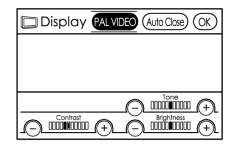
(a) During the VTR image, check if changing the NTSC/PAL signal by pressing the remote controller DISPLAY switch, entering the RSE image adjustment screen, and pressing the PAL VIDEO button returns the image to normal. OK: Returned to normal after pressing image quality adjustment screen PAL VIDEO button. |
|

|
2. |
CHECK HARNESS AND CONNECTOR (MULTI-DISPLAY SELECTOR - BODY GROUND) |
|
(a) Disconnect the L25 selector connector. |
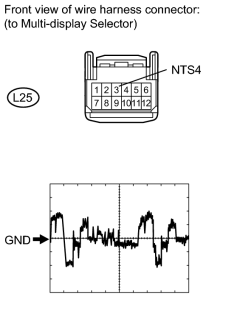
(b) Check the waveform of the television display using an oscilloscope.
Measurement Condition
|
Item |
Content |
|---|---|
|
Terminal No. (Symbol) |
L25-3 (NTS4) - Body ground |
|
Tool Setting |
200 mV/DIV., 10 μsec./DIV. |
|
Condition |
DVD displayed on television display |
OK:
Waveform is as shown in the illustration.
|

|

|