| Last Modified: 11-27-2007 | 1.6 J | |
| Service Category: Audio/Visual/Telematics | Section: Audio/Video | |
| Model Year: 2008 | Model: LX570 | Doc ID: RM000002TT5004X |
| Title: AUDIO / VIDEO: REAR SEAT ENTERTAINMENT SYSTEM: INSPECTION PROCEDURE (2008 LX570) | ||
|
Sound from Wireless Headphones is Difficult to Hear, cannot be Heard, or Quality is Poor |
INSPECTION PROCEDURE
PROCEDURE
|
1. |
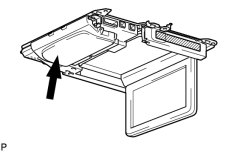
CLEAN INFRARED RAY RECEIVING PORTION |
|
(a) Check if the infrared ray receiving portion or the wireless headphone light emitting area is covered. HINT:
If necessary, perform the following step. Otherwise, proceed to the "Check Wireless Headphone" procedure. |
(b) Clean the infrared ray receiving portion on the television display.
(c) Check whether the same malfunction occurs.
OK:
The function returns to normal.
|

|
2. |
CHECK WIRELESS HEADPHONE |
(a) Check the wireless headphone setting.
(1) Check that the volume is not set to "0".
(2) Check that "MUTE" is off.
OK:
The volume is not set to "0" and "MUTE" is off.
|
|
3. |
CHECK WIRELESS HEADPHONE |
(a) Change the location of the wireless headphone and check the sound condition.
OK:
Sound is heard.
HINT:
The distance between the infrared ray receiving portion and wireless headphone light emitting area, or the angle of the two parts may be the cause.
|
|
4. |
CHECK WIRELESS HEADPHONE (for BATTERY) |
(a) Check that the dry-cell battery of the wireless headphone is not depleted.
OK:
Battery is not depleted.
|
|
5. |
REPLACE WIRELESS HEADPHONE WITH NORMAL ONE AND CHECK |
(a) Replace the wireless headphone with a normal one and check if the same problem occurs again.
OK:
Same problem does not occur.
|

|

|