| Last Modified: 11-27-2007 | 1.6 A | |
| Service Category: Vehicle Interior | Section: Door Lock | |
| Model Year: 2008 | Model: LX570 | Doc ID: RM00000363Z00AX |
| Title: DOOR LOCK: TRANSMITTER BATTERY: REPLACEMENT (2008 LX570) | ||
REPLACEMENT
1. REMOVE TRANSMITTER BATTERY
NOTICE:
Take extra care when handling these precision electronic components.
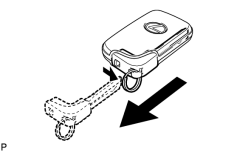
|
(a) Push and hold the release knob in the direction indicated by the arrow in the illustration. Then take the mechanical key out of the case. |
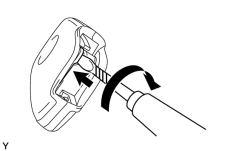
|
(b) Insert a precision screwdriver into the gap, and turn the screwdriver to detach the transmitter housing cover. HINT:
Tape the screwdriver tip before use. |
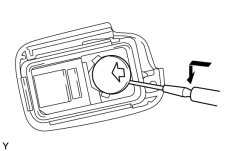
|
(c) Insert a precision screwdriver into the gap and remove the battery (lithium battery: CR1632). NOTICE:
|
2. REMOVE TRANSMITTER BATTERY (for Card Type)
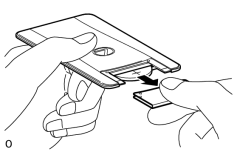
|
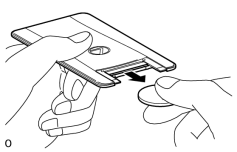
(a) Lightly hold and pull the transmitter housing cover in the direction of the arrow as shown in the illustration. HINT:
NOTICE:
Do not insert a screwdriver, etc. between the case and battery cover and forcefully bend the battery cover. This will deform the battery cover. |
|
(b) Remove the transmitter battery (lithium battery: CR2412). |
3. INSTALL TRANSMITTER BATTERY (for Card Type)
|
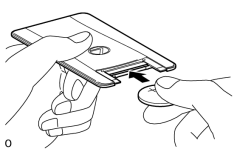
(a) Push in and install a new transmitter battery (lithium battery (CR2412)) while being careful of the following: 1) the positive (+) and negative (- ) terminals of the battery; and 2) being sure to insert the battery between the 2 terminals and deep into the card, in the direction of the arrow. HINT:
Check if the card terminals are damaged or if the card interior has foreign matter. NOTICE:
|
|
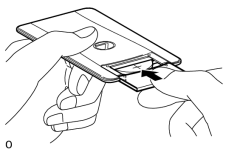
(b) Install the transmitter housing cover so that it clips onto the case. NOTICE:
|
4. INSTALL TRANSMITTER BATTERY
|
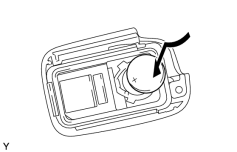
(a) Install a new battery (lithium battery: CR1632) with the positive (+) side facing upward, as shown in the illustration. NOTICE:
|
|
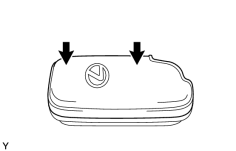
(b) Install the transmitter housing cover by pressing down on it as shown in the illustration. |
(c) Insert the mechanical key into the transmitter.
(d) Press one of the transmitter switches and check that the LED illuminates.

|

|