| Last Modified: 11-27-2007 | 1.6 A | |
| Service Category: Vehicle Exterior | Section: Exterior Panels/Trim | |
| Model Year: 2008 | Model: LX570 | Doc ID: RM0000038K2004X |
| Title: EXTERIOR PANELS / TRIM: REAR BUMPER: REMOVAL (2008 LX570) | ||
REMOVAL
1. REMOVE REAR QUARTER PANEL MUDGUARD LH

2. REMOVE REAR QUARTER PANEL MUDGUARD RH
3. REMOVE REAR NO. 1 BUMPER PLATE
(a) Put protective tape around the bumper plate.
(b) Detach the 20 claws and remove the bumper plate.
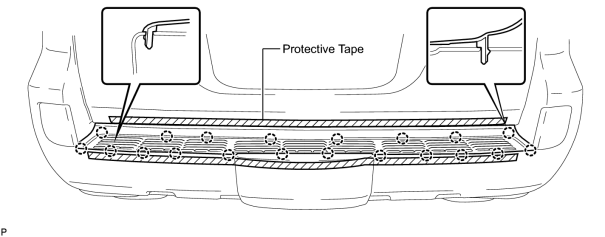
4. REMOVE REAR BUMPER COVER
(a) Put protective tape around the bumper cover.
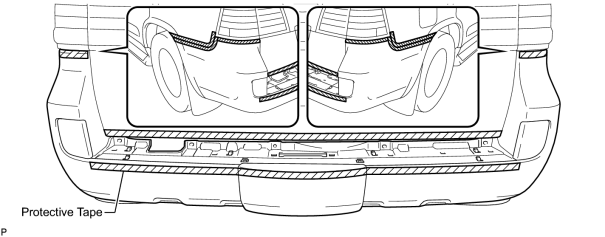
(b) Open the tail gate and remove the 4 clips.
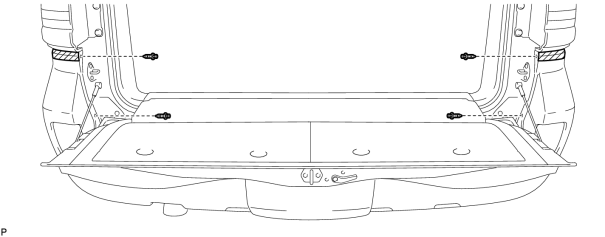
(c) Close the tail gate.
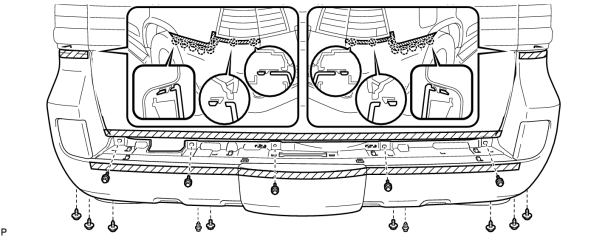
(d) Remove the 7 bolts, 6 screws and 2 clips.
(e) w/o Intuitive Parking Assist System:
Detach the 16 claws and remove the bumper cover.
(f) w/ Intuitive Parking Assist System:
Detach the 16 claws, disconnect the No. 2 frame wire connector and remove the bumper cover.
5. REMOVE REAR COMBINATION LIGHT ASSEMBLY LH
6. REMOVE REAR COMBINATION LIGHT ASSEMBLY RH
HINT:
Use the same procedures described for the LH side.
7. REMOVE REAR UPPER BUMPER RETAINER LH
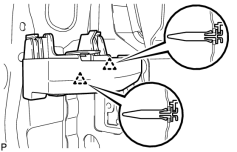
(a) Detach the 2 clips and remove the bumper retainer.
8. REMOVE REAR UPPER BUMPER RETAINER RH
HINT:
Use the same procedures described for the LH side.
9. REMOVE REAR BUMPER SIDE SUPPORT LH
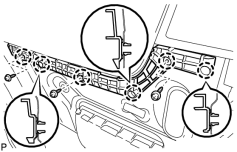
(a) Remove the 3 screws.
(b) Detach the 6 claws and remove the bumper side support.
10. REMOVE REAR BUMPER SIDE SUPPORT RH
HINT:
Use the same procedures described for the LH side.
11. REMOVE REAR NO. 2 BUMPER REINFORCEMENT
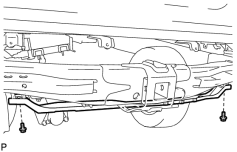
(a) Remove the 2 bolts and bumper reinforcement.
12. REMOVE REAR BUMPER ARM BRACKET
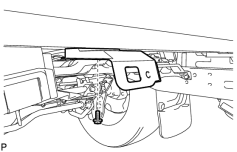
HINT:
Use the same procedure to remove the bumper arm bracket on the other side.
(a) Remove the bolt and bumper arm bracket.
13. REMOVE REAR BUMPER ARM BRACKET LH
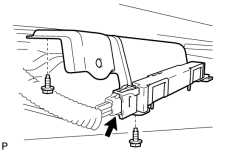
(a) Disconnect the connector.
(b) Remove the 2 bolts and bumper arm bracket.
14. REMOVE NO. 2 LUGGAGE COMPARTMENT SIDE COVER PROTECTOR
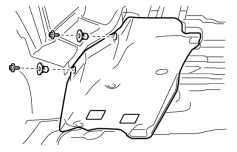
(a) Remove the 2 screws, 2 grommets and protector.
15. REMOVE NO. 1 LUGGAGE COMPARTMENT SIDE COVER PROTECTOR
HINT:
Use the same procedures described for the No. 2 luggage compartment side cover protector.

|

|