| Last Modified: 11-27-2007 | 1.6 A | |
| Service Category: Audio/Visual/Telematics | Section: Park Assist/Monitoring | |
| Model Year: 2008 | Model: LX570 | Doc ID: RM000003EAE000X |
| Title: PARK ASSIST / MONITORING: TELEVISION CAMERA (for Side): INSTALLATION (2008 LX570) | ||
INSTALLATION
1. INSTALL SIDE TELEVISION CAMERA ASSEMBLY
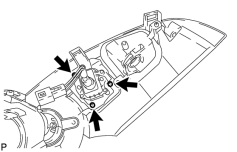
|
(a) Install the side television camera with the 3 screws. |
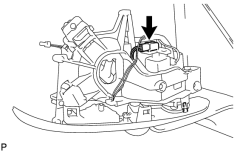
|
(b) Attach the claw and connect the connector. NOTICE:
Be careful when attaching the claw as it is easily broken. |
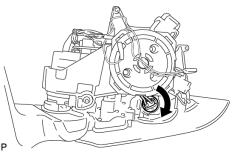
|
(c) Turn the bulb in the direction shown in the illustration to install it. |
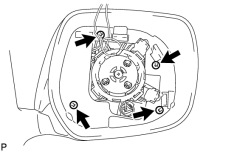
|
(d) Install the 4 screws and cover. |
|
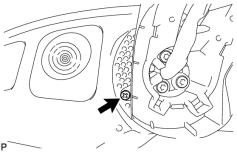
(e) Install the screw. |
|
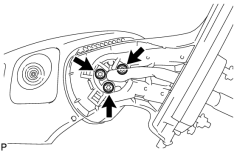
(f) Using a T25 "TORX" socket wrench, install the 3 screws. Torque: 3.8 N·m (39 kgf·cm) |
|
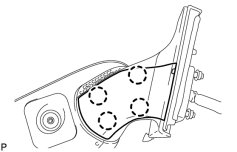
(g) Attach the 4 claws to install the cover. |
|
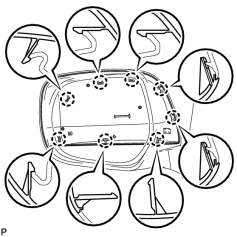
(h) Attach the 8 claws to install the outer mirror cover RH. |
2. INSTALL OUTER MIRROR RH

3. INSTALL OUTER REAR VIEW MIRROR ASSEMBLY RH
(a) Install the outer rear view mirror RH
.

|

|