REPAIR INSTRUCTION > CUSTOMIZE PARAMETERS |
| POWER TILT AND POWER TELESCOPIC STEERING COLUMN |
| DISPLAY | DEFAULT | CONTENTS | SETTING |
| Autoaway/Return Function | ON | ON/OFF of the auto away/return function | ON/OFF |
| AIR CONDITIONING SYSTEM |
| DISPLAY (ITEM) | DEFAULT | CONTENTS | SETTING |
| Shift Set Temperature (Set Temp Shift) | NORMAL | To control with the shifted temperature against the display temperature. | +2C / +1C / NORMAL / -1C / -2C |
| Air Inlet Mode (Air Inlet Mode) | AUTO | In case of turning the A/C ON when you desire to make the compartment cool down quickly, this is the function to change the mode automatically to RECIRCULATED mode. | MANUAL / AUTO |
| Compressor Mode (Compressor Mode) | AUTO | Function to turn the A/C ON automatically by pressing the AUTO button when the blower is ON and the A/C is OFF. | MANUAL / AUTO |
| Compressor / DEF Mode (Comprs / DEF oper) | LINK | Function to turn the A/C ON automatically linking with the FRONT DEF button when the A/C is OFF. | NORMAL / LINK |
| Foot / DEF Auto Mode (Foot/DEF Mode) | ON | Function to turn the air flow from FOOT/DEF to ON automatically when AUTO MODE is ON. | OFF / ON |
| Foot / DEF Auto Blow Up (Auto Blow Up) | ON | Function to switch the blower level automatically when the defroster is ON. | OFF / ON |
| Ambient Temperature Shift (Ambient Tmp Sft) | NORMAL | To control with the shifted ambient temperature against the display ambient temperature. | +3C / +2C / +1C / NORMAL / -1C / -2C / -3C |
| THEFT DETERRENT SYSTEM |
| DISPLAY (ITEM) | DEFAULT | CONTENTS | SETTING |
| Warning by Horn | ON | Function that makes vehicle horn able to be used as a warning device | ON/OFF |
| LIGHTING SYSTEM |
| DISPLAY (ITEM) | DEFAULT | CONTENTS | SETTING |
| Lighting Time | 15 s | To change the lighting time after closing the door. (It will quickly fade out in case of turning the ignition ON.) | 7.5 s / 15 s / 30 s |
| Operation of Illumination System | ON | Function to light up the step light, center console light and door inside handle light when one of the following occurs; the ignition turned ON, door unlock or door open. | ON / OFF |
| Light Control) | ON | Function to light up the step light and door inside handle light when the ignition switch is ON and the shift position is not P. | ON / OFF |
| I/L ON W/Door Key Unlock | ON | Function to light up the interior light*, ignition light and step light when unlocking with the door key cylinder. *: Interior light comes on when the interior light switch is at the DOOR position. | ON / OFF |
| I/L when ACC OFF | ON | Function to light the interior light* and door courtesy light when the ignition switch is operated from "ACC" to "LOCK". *: interior light comes on when the interior light switch is at the DOOR position. | ON / OFF |
| DISPLAY (ITEM) | DEFAULT | CONTENTS | SETTING |
| Light Auto OFF Delay | 30 s | Function to keep on lighting the headlight for a certain period of time after closing all the doors with the ignition switch turned OFF from ON under the condition that the light control switch is at HEAD or AUTO with the headlight ON. | OFF / 30 s / 60 s / 90 s |
| Light control type | CURRENT | To change the control logic when the light control switch is AUTO position. Refer to the *1 illustration. | CURRENT / OLD |
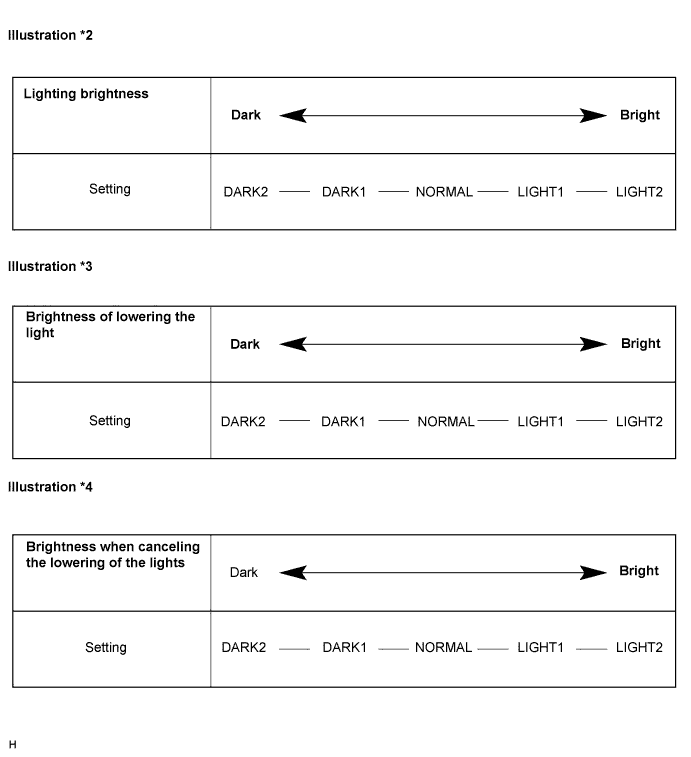
| Turn ON luminous intensity | NORMAL | To adjust the sensitivity of the lighting illumination. Refer to the *2 illustration. | DARK2 / DARK1 / NORMAL / LIGHT1 / LIGHT2 |
| Display extinction ON sensitivity | NORMAL | To change the brightness of lowering the lights such as the indicator light of the combination meter, A/C indicator light, clock. Refer to *3 illustration. | DARK2 / DARK1 / NORMAL / LIGHT1 / LIGHT2 |
| Display extinction OFF sensitivity | NORMAL | To change the brightness of canceling the lowering the lights such as the indicator light of the combination meter, A/C indicator light, clock. Refer to *4 illustration. | DARK2 / DARK1 / NORMAL / LIGHT1 / LIGHT2 |
| Brightness of the surrounding when lighting | Lighting delay | Delay of turning light off | **2 | |
| OLD | Old logic | 6 sec. | 6 sec. | 3 sec. |
| CURRENT | New logic **1 ('97/8-) | 15 sec. | 15 sec. | 15 sec. |
| WIPER AND WASHER SYSTEM |
| Display (Item) | Default | Contents | Setting |
| SPEED MODE (Speed mode) | Avail | Function to change to the intermittent operation when the vehicle comes to a stop ( 0 vehicle speed) from running condition in case that the wiper switch is at the LO position. | NOT AVAIL / AVAIL |
| AUTO WIPER (Auto wiper) | Avail | Function to operate the wiper automatically when it is raining. | NOT AVAIL / AVAIL |
| REWIPE CONTROL (Rewipe control) | SPD MOD | Function to change time until operating the wiper to prevent dropping after having used the washer. | OFF / 3 s / SPD MOD |
| POWER DOOR LOCK CONTROL SYSTEM |
CUSTOMIZING FUNCTION WITH INTELLIGENT TESTER (REFERENCE)
| Display (Item) | Default | Contents | Setting |
| Auto Lock Time | 30s | Function that selects AUTO LOCK time (30 sec. or 60 sec.) | 30s/60s |
| All Unlock/Open-Close (All unlock w/ D door open-close) | OFF | Function that unlocks all other doors when opening driver side door within 10 seconds after turning the ignition switch off from ON | ON/OFF |
| WIRELESS DOOR LOCK CONTROL SYSTEM |
| Item (Display) | Default | Contents | Setting |
| Open Door Warning (Open door warning) | ON | If a door is not completely closed and LOCK is pressed, this function sounds a buzzer for 10 seconds. | ON / OFF |
| Wireless Buzzer Resp (Buzzer answer-back of Wireless) | ON | This function makes the wireless door lock buzzer sound for answer-back when LOCK/UNLOCK is pressed. | ON / OFF |
| Wireless Control (Wireless door lock control function) | ON | This function turns the wireless door lock function on or off. | ON / OFF |
| Auto Lock Time (Auto lock time) | 30 s | This function controls the amount of time from unlocking doors to automatic re-locking. | 30 s / 60 s |
| Hazard Answer Back (Hazards answer-back for wireless door lock operation) | ON | When LOCK is pressed, all hazard warning lights flash once. When UNLOCK is pressed, all hazard warning lights flash twice. | ON / OFF |
| METER / GAUGE SYSTEM |
Buzzer ON/OFF Setting

| Steps | Driver Side and Passenger Side Seat Belt Buzzer | Front Passenger Side Seat Belt Buzzer |
| 1 | Turn the ignition switch to the ON position. | Turn the ignition switch to the ON position. |
| 2 | Press the ODO/TRIP switch until the odometer displays "ODO". | Press the ODO/TRIP switch until the odometer displays "ODO". |
| 3 | Turn the ignition switch off. | Turn the ignition switch off. |
| 4 | Turn the ignition switch to the ON position. | Turn the ignition switch to the ON position. |
| 5 | Press the ODO/TRIP switch immedeately (within 6 seconds) and hold it down for 10 seconds or more. | Sit in the front passenger seat. Press the ODO/TRIP switch immediately (within 6 seconds) and hold it down for 10 seconds or more. |
| 6 | Continue holding down the ODO/TRIP switch and fasten the driver side seat belt. | Continue holding down the ODO/TRIP switch, fasten and release the passenger side seat belt. |
| 7 | Check that the odometer displays either "SEAT BELT BUZZER ON" or "SEAT BELT BUZZER OFF" | Check that the odometer displays either "SEAT BELT BUZZER ON" or "SEAT BELT BUZZER OFF" |
| 8 | Press the ODO/TRIP switch to change the display to "SEAT BELT BUZZER OFF". | Press the ODO/TRIP switch to change the display to "SEAT BELT BUZZER OFF". |
| 9 | Turn the ignition switch off. | Turn the ignition switch off. |
| 10 | Turn the ignition switch to the ON position. | Turn the ignition switch to the ON position. |
| 11 | Check that no buzzer sounds. | Check that no buzzer sounds. |
OTHER PARAMETERS (Using Intelligent Tester)
| Display (Item) | Default | Contents | Setting |
| KEY REMND SOUND | NORMAL | Function to change cycle of key remind warning buzzer. | 600 / 900 / 1,200 ms |
| POWER WINDOW CONTROL SYSTEM |
| DISPLAY (ITEM) | DEFAULT CONTENTS | CONTENTS | SETTING |
| UP/DOOR KEY (Door key linked P/W UP) | ON | Function that enables all power windows to move up manually, via manual operation, when driver side door key cylinder is held in lock position for 1.5 seconds when ignition switch is off. | ON/OFF |
| DOWN/DOOR KEY (Door key linked P/W DOWN) | ON | Function that enables all power windows to move down manually, via manual operation, when driver side door key cylinder is held in unlock position for 1.5 seconds when ignition switch is off. | ON/OFF |
| DOWN/WIRELESS (P/W DOWN w/ transmitter) | ON | Function that enables all power windows to move down manually, via manual operation, when unlock switch on transmitter is held for 1.5 seconds when ignition switch is off. | ON/OFF |
| UP/WIRELESS (P/W UP w/ transmitter) | ON | Function that enables all power windows to move up manually, via manual operation, when lock switch on transmitter is held for 1.5 seconds when ignition switch is off. | ON/OFF |
| POWER BACK DOOR SYSTEM |
| DISPLAY (ITEM) | DEFAULT | CONTENTS | SETTING |
| PBD SW Operation | 0.8s | Function that turns power back door closer switch ON when switch is pushed once or held down for 0.8 sec. | 0.8s/ON |
| PBD Buzzer Volume | LARGE | Function that adjusts the volume of warning buzzer that notifies power back door is operating | OFF/SMALL/LARGE |
| Wireless PBD Operation | 0.8s | Function that operates power back door when transmitter switch is pressed in specified way (1-press, 2-presses, 0.8 sec.-press or OFF*1) | ON/TWICE ON/0.8s/OFF |
| PBD Assist Open*2 | OFF | Function that helps power back door opening operation | ON/OFF |
| SLIDING ROOF SYSTEM |
CUSTOMIZING FUNCTION WITH INTELLIGENT TESTER (REFERENCE)
| Display (Item) | Default | Contents | Setting |
| OPEN/DOOR KEY (Door key related OPEN) | ON | Function to manually open sliding roof linked with power window if holding driver side door key for 1.5 seconds or more to unlock position when engine switch is off | ON/OFF |
| CLOSE/DOOR KEY (Door key related CLOSE) | ON | Function to manually close sliding roof linked with power window if holding driver side door key for 1.5 seconds or more to lock position when engine switch is off | ON/OFF |
| OPEN/WIRELESS (Wireless key related OPEN) | ON | Function to manually open sliding roof linked with power window if pressing transmitter UNLOCK switch for 1.5 seconds or more when engine switch is off | ON/OFF |
| DOOR KEY OPER (Door key related operation) | SLIDE | Function to select tilt up or slide open of manual sliding roof operation linked with power window Activate by holding driver side door key for 1.5 seconds or more to unlock position when engine switch is off | TILT/SLIDE |
| WIRELESS OPER (Wireless key related operation) | SLIDE | Function to select tilt up or slide open of manual sliding roof operation linked with power window Activate by pressing on transmitter UNLOCK switch for 1.5 seconds or more when engine switch is off | TILT/SLIDE |
