AIR CONDITIONING SYSTEM > ACTUATOR CHECK |
| ACTUATOR CHECK |
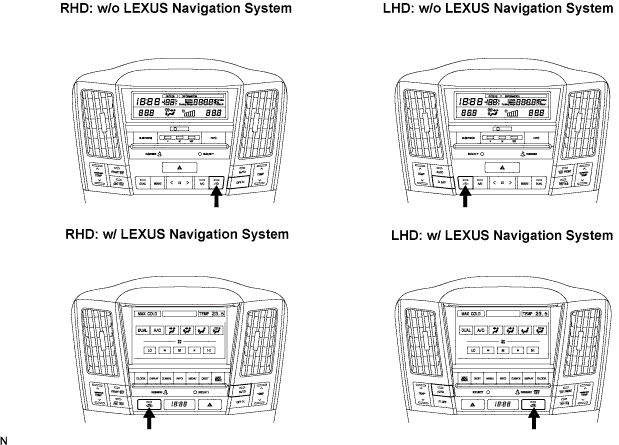
After entering the DTC check mode (Sensor Check Mode), press the "R/F" switch.
At each damper, the motor and relay automatically operate the actuator check at 1 second intervals from step No.1 to No.10 continuously, check the temperature and air flow visually and by hand.
If the slower display is desired, press the "UPDr" switch and change it to step operation. Each time the "UPDr" switch is pressed, the display changes by 1 step.
| Step No. | Display code | Conditions | ||||
| Blower level | Air flow vent | Air inlet damper | Air mix damper | A/C compressor revolution speed (rpm) | ||
| 1 | 0 | 0 | FACE (0 %) | FRESH (109 %) | "COOL" side (-5 %) | 0 |
| 2 | 1 | 1 | FACE (0 %) | FRESH (109 %) | "COOL" side (-5 %) | 0 |
| 3 | 2 | 17 | FACE (0 %) | R/F (50 %) | "COOL" side (-5 %) | 8,600 |
| 4 | 3 | 17 | FACE (0 %) | RECIRCULATION (-9 %) | "COOL" side (-5 %) | 8,600 |
| 5 | 4 | 17 | B/L (33.5 %)*1 (23.5 %)*2 | FRESH (109 %) | "COOL"/"HOT" (50.0% opened) | 8,600 |
| 6 | 5 | 17 | FOOT (AUTO) (53.5 %)*1 (56.5 %)*2 | FRESH (109 %) | "COOL"/"HOT" (50.0% opened) | 5,000 |
| 7 | 6 | 17 | FOOT (MANUAL) (53.5 %)*1 (56.5 %)*2 | FRESH (109 %) | "COOL"/"HOT" (50.0% opened) | 5,000 |
| 8 | 7 | 17 | FOOT (MANUAL) (53.5 %)*1 (56.5 %)*2 | FRESH (109 %) | "HOT" side (105 %) | 5,000 |
| 9 | 8 | 17 | F/D (73.5 %)*1 (76.5 %)*2 | FRESH (109 %) | "HOT" side (105 %) | 5,000 |
| 10 | 9 | 31 | DEF (100 %) | FRESH (109 %) | "HOT" side (105 %) | 5,000 |
