DTC    C1235/35    Foreign Object is Attached on Tip of Front Speed Sensor RH

DTC    C1236/36    Foreign Object is Attached on Tip of Front Speed Sensor LH

DTC    C1238/38    Foreign Object is Attached on Tip of Rear Speed Sensor RH

DTC    C1239/39    Foreign Object is Attached on Tip of Rear Speed Sensor LH

DTC    C1275/75    Abnormal Change in Output Signal of Front Speed Sensor RH (Test Mode DTC)

DTC    C1276/76    Abnormal Change in Output Signal of Front Speed Sensor LH (Test Mode DTC)

DTC    C1277/77    Abnormal Change in Output Signal of Rear Speed Sensor RH (Test Mode DTC)

DTC    C1278/78    Abnormal Change in Output Signal of Rear Speed Sensor LH (Test Mode DTC)

for Preparation Click here


DESCRIPTION

F000010E04
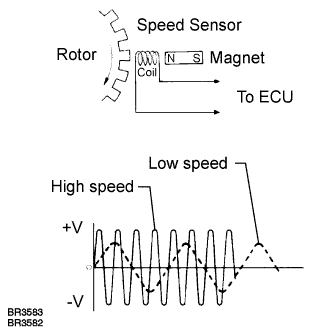
The speed sensor detects wheel speed and sends the appropriate signals to the ECU. These signals are used to control the ABS control system. The front and rear rotors have 48 serrations respectively.
When the rotors rotate, the magnetic field emitted by the permanent magnet in the speed sensor generates an AC voltage. Since the frequency of this AC voltage changes in direct proportion to the speed of the rotor, the frequency is used by the ECU to detect the speed of each wheel.
When foreign matter adheres to the speed sensor tip or sensor rotor, or the rotor teeth are chipped, these DTCs are output. An abnormal waveform input from the sensor determines these conditions.
These DTCs may be detected when a malfunction occurs in the connector terminals or wire harness of the speed sensor circuit.
DTCs C1275/75 to C1278/78 can be deleted when the speed sensor sends a vehicle speed signal or the Test Mode ends. DTCs C1275/75 to C1278/78 are output only in the Test Mode.

DTC No.
INF Code
DTC Detecting Condition
Trouble Area
C1235/35
302
Pulse waveform of speed sensor signal is abnormal for at least 5 sec. when vehicle speed is 12 mph (20 km/h) or more.
  1. Right front speed sensor
  2. Each speed sensor circuit
  3. Sensor installation
  4. Speed sensor rotor
  5. Skid control ECU
C1236/36
303
Pulse waveform of speed sensor signal is abnormal for at least 5 sec. when vehicle speed is 12 mph (20 km/h) or more.
  1. Left front speed sensor
  2. Each speed sensor circuit
  3. Sensor installation
  4. Speed sensor rotor
  5. Skid control ECU
C1238/38
304
Pulse waveform of speed sensor signal is abnormal for at least 5 sec. when vehicle speed is 12 mph (20 km/h) or more.
  1. Right rear speed sensor
  2. Each speed sensor circuit
  3. Sensor installation
  4. Speed sensor rotor
  5. Skid control ECU
C1239/39
305
Pulse waveform of speed sensor signal is abnormal for at least 5 sec. when vehicle speed is 12 mph (20 km/h) or more.
  1. Left rear speed sensor
  2. Each speed sensor circuit
  3. Sensor installation
  4. Speed sensor rotor
  5. Skid control ECU

HINT:
  1. DTC C1235/35 is for the right front speed sensor.
  2. DTC C1236/36 is for the left front speed sensor.
  3. DTC C1238/38 is for the right rear speed sensor.
  4. DTC C1239/39 is for the left rear speed sensor.


WIRING DIAGRAM

Refer to DTCs C0200/31 and C0205/32 (Click here) or DTC C0210/33 and C0215/34 (Click here).

INSPECTION PROCEDURE

NOTICE:
When replacing the skid control ECU, perform initialization of linear solenoid valve and calibration (Click here).

1.INSPECT SENSOR AND SENSOR ROTOR SERRATIONS


    C112029E07
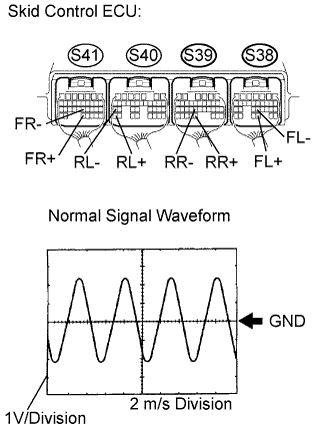
  1. Connect the oscilloscope to terminals S41-32 (FR+) and S41-22 (FR-), S38-28 (FL+) and S38-22 (FL-), S39-31 (RR+) and S39-23 (RR-) or S40-35 (RL+) and S40-27 (RL-) of the skid control ECU.

  1. Drive the vehicle at approximately 19 mph (30 km/h), and check the signal waveform.

    OK:
    A waveform as shown in the figure should be output.

    1. As the vehicle speed (wheel revolution speed) increases, a cycle of the waveform narrows and the fluctuation in the output voltage becomes greater.
    2. When noise is identified in the waveform on the oscilloscope, error signals are generated due to the speed sensor rotor's scratches, looseness or foreign matter attached to it.

    Result:

    Condition
    Proceed To
    OK
    A
    NG (The waveform is abnormal, and the waveform changes by vibrating the sensor.)
    B
    NG (The waveform is abnormal, and the waveform does not change by vibrating the sensor.)
    C


B
REPAIR OR REPLACE HARNESS OR CONNECTOR

C
Go to step 3
A


2.RECONFIRM DTC
  1. Clear the DTC (Click here).

  1. Turn the ignition switch on.

  1. Drive the vehicle at the speed of 20 km/h (12 mph) or more for 60 seconds or more.

  1. Check that the same DTC is recorded (Click here).

    HINT:
    Reinstall the sensors, connectors, etc. and restore the previous vehicle conditions before rechecking for DTCs.


    Result:

    Condition
    Proceed To
    DTC is not output
    A
    DTC is output
    B


B
REPLACE SKID CONTROL ECU
A

END 

3.INSPECT SPEED SENSOR TIP
  1. Remove the axle hub and speed sensor (Click here,Click here ).

  1. Check the sensor tip.

    OK:
    No scratches or foreign matter on the sensor tip.

    NOTICE:
    Check the speed sensor signal after the replacement (Click here).


NG
CLEAN OR REPLACE SPEED SENSOR
OK


4.INSPECT SPEED SENSOR ROTOR
  1. Remove the axle hub and speed sensor rotor (Click here, Click here).

  1. Check the sensor rotor serrations.

    OK:
    No scratches, missing teeth or foreign matter on the rotors.

    HINT:
    If there is foreign matter in the rotor, remove it and check the output waveform after reassembly.

    NOTICE:
    Check the speed sensor signal after the replacement (Click here).


NG
CLEAN OR REPLACE SPEED SENSOR ROTOR
OK

REPLACE SPEED SENSOR