METER / GAUGE SYSTEM > Speedometer Malfunction |
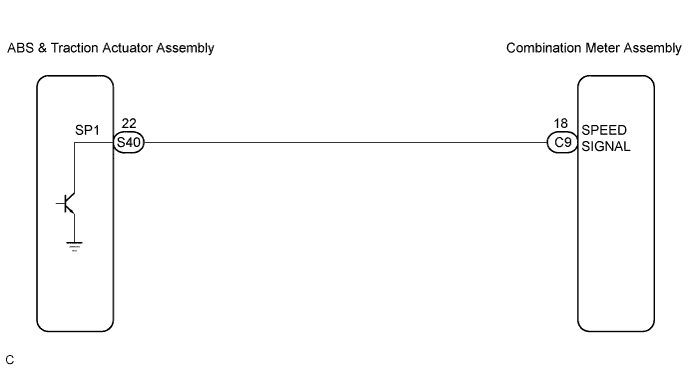
| 1.PERFORM ACTIVE TEST BY INTELLIGENT TESTER |
Operate the intelligent tester according to the steps on the display and select "ACTIVE TEST".
| Item | Test Details | Diagnostic Note |
| Speed Meter Operation | 0 / 40 (24) / 80 (48) / 120 (72) / 160 (96) / 200 (120) km/h (mph) | - |
|
| ||||
| OK | |
 |
| 2.READ VALUE OF INTELLIGENT TESTER |
Operate the intelligent tester according to the steps on the display and select "DATA LIST".
| Item | Measurement Item/Range (Display) | Normal Condition | Diagnostic Note |
| Vehicle Speed Meter | Vehicle speed / Min.: 0 km/h (0 mph), Max.: 255 km/h (158 mph) | Almost same as actual speed (When driving) | - |
|
| ||||
| OK | ||
 | ||
| ||
| 3.READ VALUE OF INTELLIGENT TESTER |
Operate the intelligent tester according to the steps on the display and select "DATA LIST".
| Item | Measurement Item/Range (Display) | Normal Condition | Diagnostic Note |
| FR/FL/RR/RL Wheel Speed | Vehicle speed / Min.: 0 km/h (0 mph), Max.: 326 km/h (202 mph) | Almost same as actual speed (When driving) | - |
|
| ||||
| OK | |
|
| 4.INSPECT COMBINATION METER ASSEMBLY |
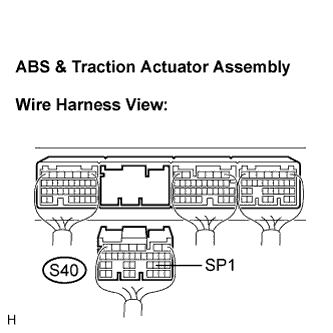 |
Disconnect the S40 connector.
Measure the voltage according to the value(s) in the table below.
| Tester Connection | Condition | Specified Condition |
| S40-22 (SP1) - Body ground | Turn the ignition switch to the ON position. | 10 to 14 V |
|
| ||||
| OK | |
|
| 5.INSPECT COMBINATION METER ASSEMBLY |
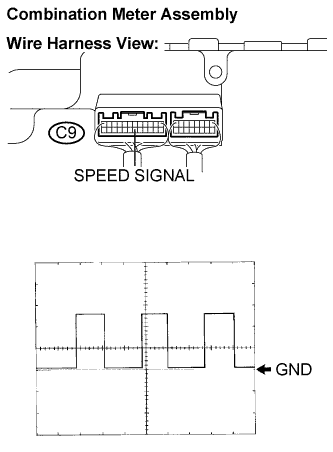 |
Check the input signal waveform.
Remove the combination meter assembly with connector(s) still connected.
Connect the oscilloscope to the terminals C9-18 (SPEED SIGNAL) and body ground.
Start the engine.
Check the signal waveform according to the condition(s) in the table below.
| Item | Condition |
| Tool setting | 5 V/DIV., 20 ms/DIV. |
| Vehicle condition | Driving at approx. 20 km/h (12 mph) |
|
| ||||
| OK | ||
| ||
| ||
| 6.CHECK HARNESS AND CONNECTOR (COMBINATION METER AND ABS & TRACTION ACTUATOR ASSEMBLY) |
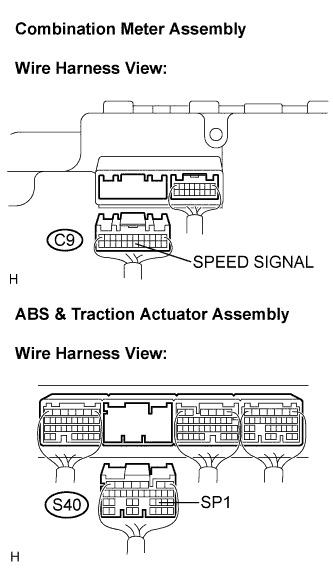 |
Disconnect the C9 and S40 connectors.
Measure the resistance according to the value(s) in the table below.
| Tester Connection | Condition | Specified Condition |
| C9-18 (SPEED SIGNAL) S40-22 (SP1) | Always | Below 1 Ω |
| C9-18 (SPEED SIGNAL) - Body ground | Always | 10 kΩ or higher |
|
| ||||
| OK | ||
| ||
| ||


