WIRELESS DOOR LOCK CONTROL SYSTEM > DTC CHECK / CLEAR |
| DTC CHECK/CLEAR (USING SST CHECK WIRE:) |
 |
DTC check
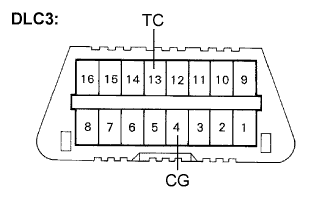
Using SST, short-circuit terminals TC and CG of the DLC3.
Turn the ignition switch to the ON position.
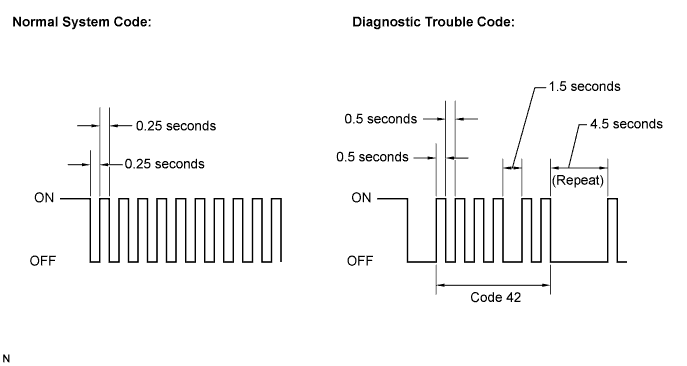
Read and record DTCs from the door warning light on the combination meter. As an example, refer to the chart below for the blinking patterns of the normal system code and diagnostic trouble code 42.
DTC clear
Turn the ignition switch off.
If DTCs are indicated, repair the relevant circuits referring to the DIAGNOSTIC TROUBLE CODE CHART (Click here).
Clear the DTCs according to either one of the following procedures:
Recheck DTCs.
| DTC CHECK/CLEAR (USING INTELLIGENT TESTER:) |
  |
DTC check
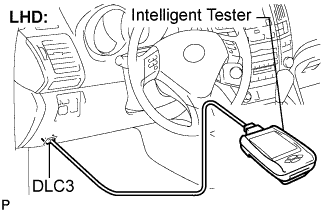
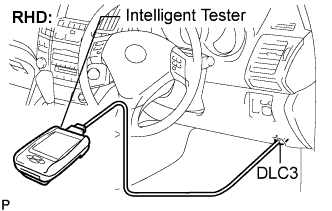
Connect the intelligent tester to the DLC3.
Turn the ignition switch to the ON position.
Read the DTCs on the tester screen.
DTC clear
Connect the intelligent tester to the DLC3.
Turn the ignition switch to the ON position.
Clear the DTCs following the prompts on the tester screen.
