POWER DOOR LOCK CONTROL SYSTEM > OPERATION CHECK |
| CHECK ELECTRICAL DOOR LOCK OPERATION |
Check the basic function.
Check that all doors lock when the door control switch (for manual operation) is turned to LOCK and all doors unlock when turned to UNLOCK.
Check that all doors lock when the driver side door lock key cylinder is turned to LOCK using the key.
Check that only the driver side door unlocks when the driver side door lock key cylinder is turned to UNLOCK and all doors unlock when turned to UNLOCK once again within 3 seconds using the key (2-step unlocking function).
Check the key confine prevention function.
Have the key inserted into the ignition key cylinder.
With the driver side door open, check that all doors unlock immediately after the door lock knob for the driver side door is turned to LOCK.
With the driver side door open, check that all doors unlock immediately after the door control switch (for manual operation) is turned to LOCK.
With the driver side door open, turn the driver side door lock knob to LOCK and hold it for 2 seconds or more, and then close the driver side door. Then check that all doors unlock.
Check the security function.
Close all doors with the driver side door window open so that the door control switch can be operated from outside the vehicle.
Pull out the key, open and close the driver side door and lock the door without using the key. Under this condition, check that all doors do not unlock when the door control switch (for manual operation) is turned to UNLOCK from outside the vehicle.
Pull out the key, close and lock the driver side door by key operation. Under this condition, check that all doors do not unlock when the door control switch (for manual operation) is turned to UNLOCK from outside the vehicle.
Pull out the key, close the driver side door and lock the door by wireless door lock operation. Under this condition, check that all doors do not unlock when the door control switch (for manual operation) is turned to UNLOCK from outside the vehicle.
Check the illumination function.
Set the room light switch in the DOOR position.
With all doors locked, check that all doors unlock when the driver side door lock cylinder is turned to UNLOCK using the key. At the same time, the room light comes on.
Check that the room light goes off in approximately 15 seconds if the doors have not been opened for a while.
Check the AUTO lock function.
Lock all doors.
Unlock all doors using the transmitter or key.
Allow 30 seconds to elapse while all doors remain closed and the transmitter switch remains untouched. Then, check that all doors will lock automatically.
| CHECK DOUBLE LOCKING FUNCTION SYSTEM |
Check that the double locking system is set.
Open all the windows.
Turn the ignition switch to LOCK and remove the key.
Open and close the driver side door, and make sure that all doors and the back door are closed securely.
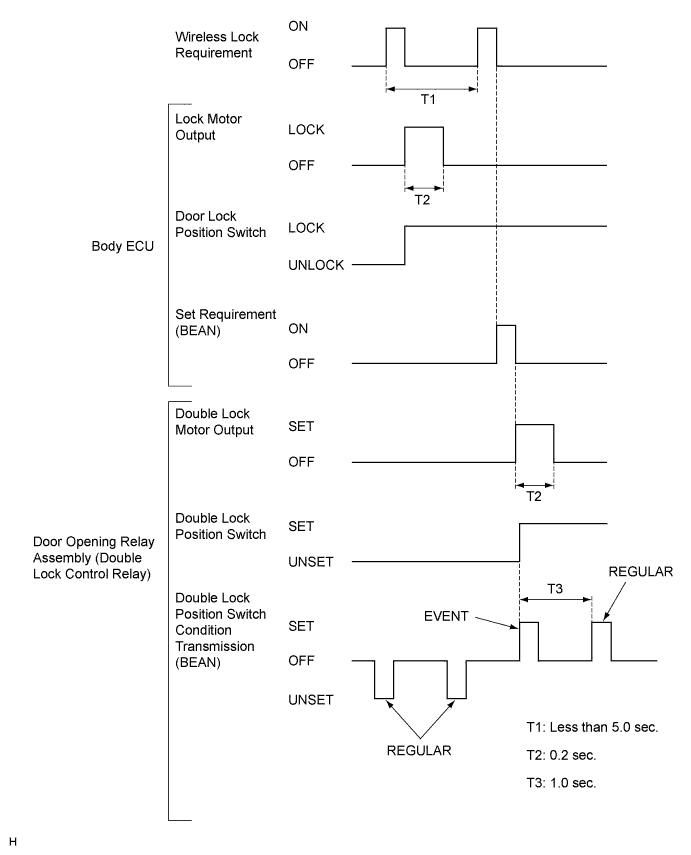
Push the LOCK switch on the wireless transmitter twice within 5 seconds, and check that the hazard warning lights flash once at this time to show that the system is set.
Try to unlock all doors by the inside handle of the vehicle, and check that none of the doors is unlocked.
Check that the double locking system is canceled.
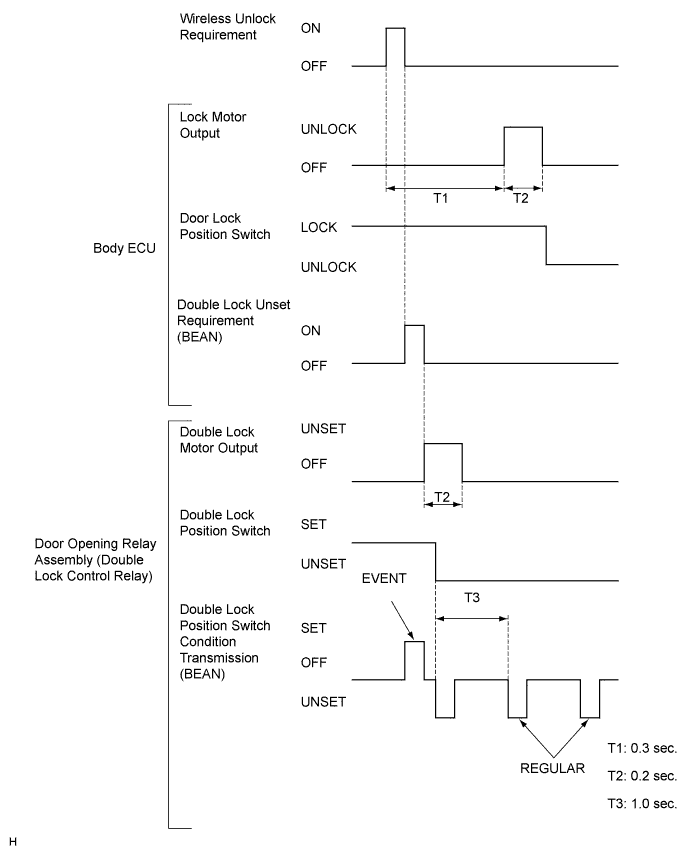
Push the UNLOCK switch on the wireless transmitter while the double locking system is set, and check that the hazard warning lights flash twice at this time to show that the system is canceled.
Check that the doors can be opened both by the inside handle and the outside handle.
Double Locking System Set Control Timing Chart.
Double Locking System Unset Control Timing Chart.
| CHECK THE FAIL-SAFE FOR THE DOUBLE LOCKING SYSTEM |
The double lock ECU will set the double locking system to OFF if there is a door in which the system is ON when either of the following conditions is met. When the system is set to OFF, the door enters the ordinary locked state.
The ignition switch is ON (key is inserted into the ignition key cylinder). [*1]
550 rpm or more engine revolutions continue for 10 seconds. [*2]
If any of the double lock position switches are not in the UNSET position after the double locking system has been set to OFF, the double lock ECU will try to set the system to OFF again 1 second later (retry function).
If the double lock ECU judges that a malfunction is caused by the BEAN, the system enters the following states until the ECU determines that the system is normal.
