NAVIGATION ECU > REMOVAL |
| 1. DISCONNECT CABLE FROM NEGATIVE BATTERY TERMINAL |
| 2. REMOVE TONNEAU COVER ASSEMBLY |
| 3. REMOVE DECK BOARD SUB-ASSEMBLY |
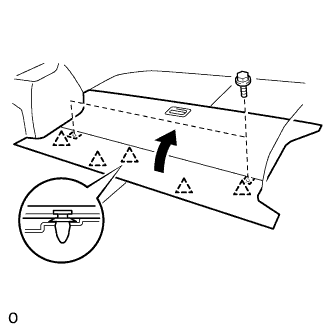 |
Disengage the 5 clips and turn up the front side of the deck board.
Remove the 2 bolts and deck board sub-assembly.
| 4. REMOVE DECK FLOOR BOX FRONT |
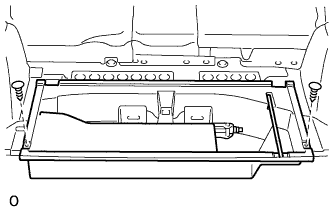 |
Using a clip remover, remove the 2 clips and deck floor box front.
| 5. REMOVE DECK FLOOR BOX REAR |
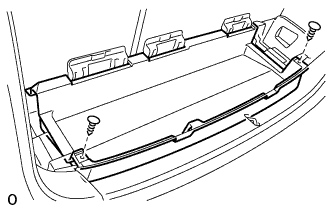 |
Using a clip remover, remove the 2 clips and deck floor box rear.
| 6. REMOVE NO.3 DECK BOARD SUB-ASSEMBLY |
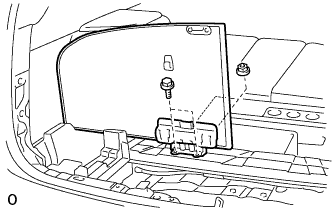 |
Remove the 2 bolts, 2 nuts and deck No.3 board sub-assembly.
| 7. REMOVE NO.2 DECK BOARD SUB-ASSEMBLY |
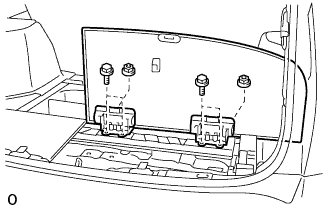 |
Remove the 4 blots, 2 nuts and deck No.2 board sub-assembly.
| 8. REMOVE REAR FLOOR FINISH PLATE |
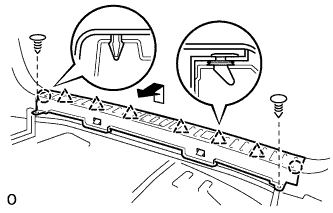 |
Using a clip remover, remove the 2 clips.
Disengage the 2 claws and 6 clips, and remove the rear floor finish plate.
| 9. REMOVE JACK CARRIER ASSEMBLY |
Remove the jack carrier support, jack assembly and jack carrier assembly.
| 10. REMOVE DECK SIDE TRIM BOX LH |
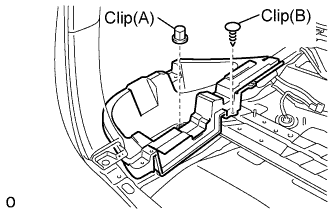 |
Remove the clip (A).
Using a clip remover, remove the clip (B) and deck side trim box.
| 11. REMOVE DECK SIDE TRIM BOX RH |
| 12. REMOVE NAVIGATION ECU |
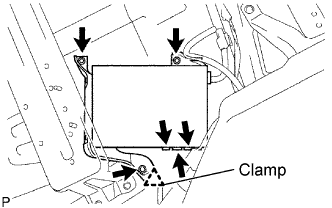 |
Disengage the clamp and disconnect the 3 connectors.
Remove the 3 bolts and the navigation ECU.
| 13. REMOVE DISC PLAYER BRACKET |
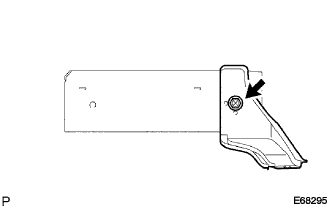 |
Remove the screw and the disc player bracket.
| 14. REMOVE NO.2 DISC PLAYER BRACKET |
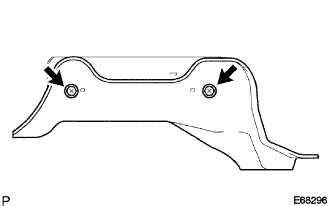 |
Remove the 2 screws and the No.2 disc player bracket.
