PARKING ASSIST MONITOR SYSTEM > ADJUSTMENT

for Preparation Click here


1. SYSTEM ADJUSTMENT
  1. This rear view monitor system can be set from the diagnostic screen of the "NAVIGATION SYSTEM".

  1. If the following operations are performed, adjustment and check on the diagnostic screen are required.

    Part Name
    Operation
    Adjustment Item
    Television camera assembly
    1. Replace
    2. Installation angle of the television camera assembly is displaced because of the removal and installation of the television camera assembly, etc.
    1. Television camera assembly optical axis (Camera position setting)
    Television camera ECU
    1. Replace
    1. Steering angle neutral point in memory
    2. Store the left and right maximum steering angle
    3. Television camera assembly optical axis (Camera position setting)


2. PREPARATION FOR ADJUSTMENT

HINT:
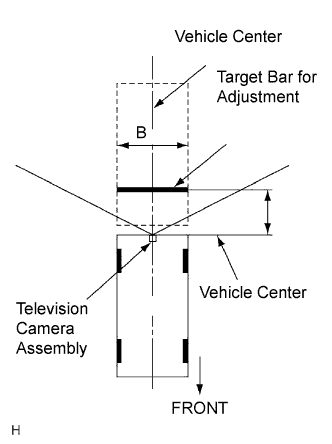
Only when adjusting the optical axis of the camera, install the target bar for adjustment.


    I037155E01
  1. Park the vehicle with the steering wheel straight ahead.

  1. Set the target bar for adjustment.

    Standard:
    A: 1,000 +- 5 mm (39.37 +- 0.20 in.)
    B: 2,000 +- 5 mm (78.74 +- 0.20 in.)

    HINT:
    1. The target bar for adjustment is a piece of tape stuck to the floor (25 +- 5 mm (0.98 +- 0.20 in.) wide by 2,000 +- 5 mm (78.74 +- 0.20 in.) long). Check the color on the screen in the vehicle and choose a tape color which can be easily seen.
    2. Before parking the vehicle, move the vehicle back and forth to check that the tires and the steering wheel are facing straight ahead.


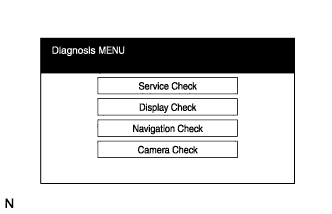
3. BOOT DIAGNOSIS MODE


    E110073
  1. Start the engine.

  1. Start the diagnostic system (Click here).

  1. Select "Camera Check" on the Diagnosis MENU.


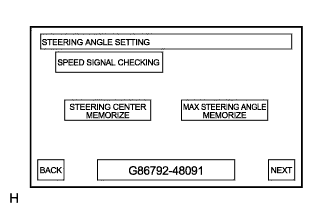
4. STEERING ANGLE SETTING


    E110003
  1. STEERING CENTER MEMORIZE

    1. Check that the position of the steering wheel is straight, and then press "STEERING CENTER MEMORIZE".
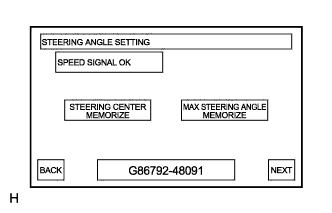
      HINT:
      1. When performing removal and installation, or replacement of the television camera assembly, the adjustment of steering angle is not required. Select "NEXT" on the steering angle setting.
      2. Even when storing the steering angle neutral point only, the system cannot store it unless the operation is completed by following the prompts from "NEXT" to "OK".
      3. When the system displays "SPEED SIGNAL CHECKING", first touch "SPEED SIGNAL CHECKING", and then "MAX STEERING ANGLE MEMORIZE". The display does not switch to the next screen if this process is not completed.


    E110004
  1. MAX STEERING ANGLE MEMORIZE

    1. After adjusting the steering angle neutral point, turn the steering wheel clockwise and counterclockwise until it stops, and press "MAX STEERING ANGLE MEMORIZE". The maximum steering angle is then stored.

      HINT:
      The key "NEXT" does not respond until the system stores the steering angle neutral point and maximum steering angle even if touched.


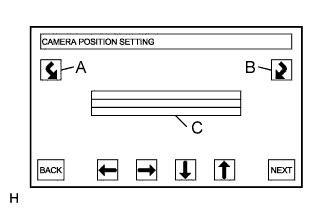
5. CAMERA POSITION SETTING


    E110005E01
  1. ROLL ANGLE, VERTICAL AND HORIZONTAL POSITION ADJUSTMENT

    1. Press switches "A" and "B" to turn "C" in the illustration so that the target bar for adjustment becomes parallel.

    2. Operate arrow switches to shift bar "C" on the monitor screen so that it comes to the center of the target bar for adjustment.


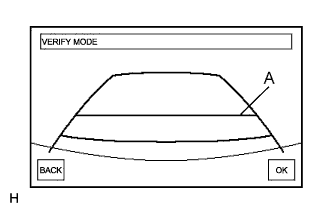
6. VERIFY MODE


    E110006E01
  1. Check that "A" and the target bar for adjustment are almost lined up. If it is not lined up, perform the steering center memorize and max steering angle memorize camera position setting procedures again.

  1. Selecting "OK" will return to the Diagnosis MENU, and complete the adjustment.

    HINT:
    Until the "OK" key is pressed, the update has not been completed.