AUDIO AND VISUAL SYSTEM > DTC CHECK / CLEAR

for Preparation Click here


HINT:
If the system cannot enter the diagnosis mode, inspect all AVC-LAN communication signals and repair or replace problem parts.
(Click here)


STARTING DIAGNOSTIC MODE


    I036772E01
  1. Turn the ignition switch to the ACC position.

  2. Turn off the audio system.

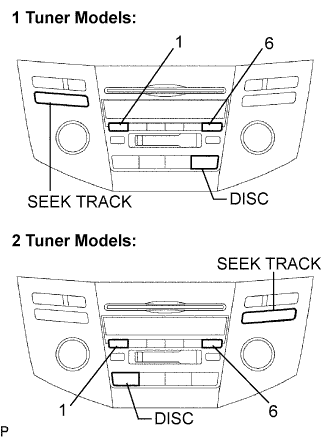
  3. While pressing the preset switches "1" and "6" at the same time, press the "DISC" 3 times.

    HINT:
    1. When the system enters the diagnostic mode, a beep sound is emitted 3 times and all the elements come on during the SW check mode.
    2. It takes approximately 40 seconds to complete the check.
    3. Turn all the elements in the LCD on.
    4. When pressing the switch, confirm a beep sound is emitted.
    5. Press the "SEEK TRACK UP" switch to enter the "System Check Screen".


FINISHING DIAGNOSTIC MODE
  1. Press the "DISC" for 2 seconds or more, or turn the ignition switch off.


CHECK DTC

HINT:
Illustrations may differ from the actual vehicle depending on the device setting and options. Therefore, some detailed areas may not be shown exactly the same as on the actual vehicle.

  1. Reference:
    In the system check mode, the system check and the diagnostic memory check are performed, and the check results are displayed in ascending order of the component codes (physical address).
    Terms
    Meaning
    Component code
    (Physical address)
    Three-digit code (in hexadecimal) given to each device comprising AVC-LAN. Corresponding to its function, individual symbol is provided.
    Logical address
    Two-digit code (in hexadecimal) given to each function and device unit in each device comprising AVC-LAN.

  2. Service check result display.

    Display
    Original word
    Meaning
    Action to be taken
    GOOD
    Good (normal)
    No DTCs are detected in both "System Check Mode" and "Diagnostic Memory Mode".
    -
    NCON
    No connection
    The system recognized the component when it was registered, but the component gives no response to the "Diagnostic Mode ON Request".
    Check the power source circuit and the communication circuit of the component indicated by the component code (physical address).
    ECHN
    Exchange
    One or more DTCs for "Exchange" are detected in either "System Check Mode" or "Diagnostic Memory Mode".
    Go to the detailed information mode to check the trouble area referring to the DTC list.
    CHEC
    Check
    When no DTCs are detected for "Exchange", one or more DTCs for "Check" are detected in either "System Check Mode" or "Diagnostic Memory Mode".
    Go to the detailed information mode to check the trouble area referring to the DTC list.
    OLD
    Old version
    Old DTC application is identified and DTC is detected in either "System Check Mode" or "Diagnostic Memory Mode".
    -
    NRES
    No response
    The device gives no response to any one of "System Check Mode ON Request", "System Check Result Request" and "Diagnostic Memory Request".
    Check the power source circuit and the communication circuit of the component indicated by the component code (physical address).

  3. Device name and physical address.

    Physical address No.
    Name
    190
    Radio receiver
    440
    Stereo component amplifier
    1C6
    Gateway ECU


  4. Service check mode.

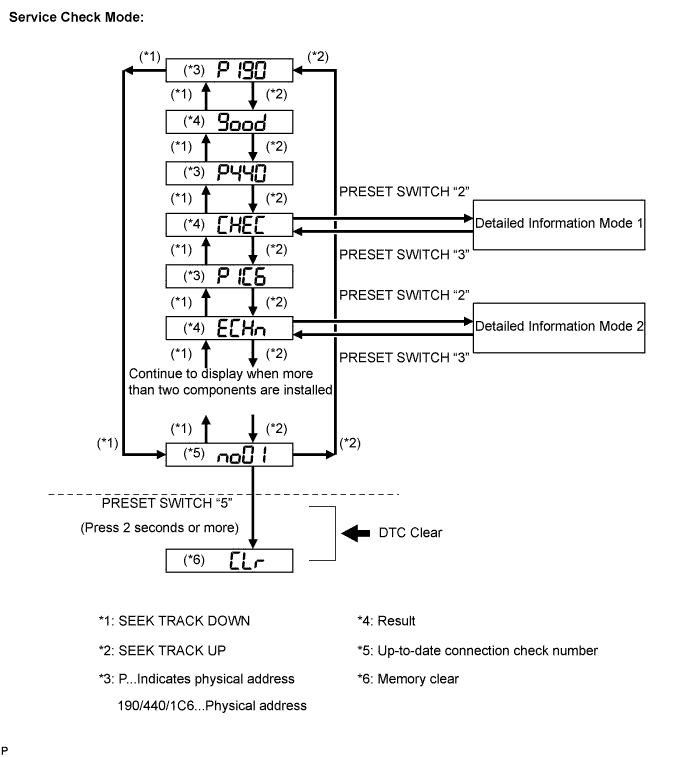
    1. Press the "SEEK TRACK" switch to see the check result of each component.


    2. The component code (physical address) is displayed first, and then the check result follows.
      HINT:
      1. If all check results are "good", the system judges that no DTC exists.
      2. If the preset switch "1" is pressed in the service check mode, service check is performed again.
      3. This illustration is only an example and may differ depending on option parts and output DTCs.


      E110920E03


  5. Detailed information mode 1

    HINT:
    1. "Detailed information mode 1" is displayed when there is no response to "System Check Result Request" and DTC is detected only in "Diagnostic Memory Request".
    2. The component device code (physical address) is displayed first, and then the check result follows.
    3. This illustration is only an example and may differ depending on option parts and output DTCs.


    1. Press the preset switch "2" to go to the "Detailed Information Mode 1".

    2. Press the "SEEK TRACK" switch to display the physical address and DTC of the component.

    3. Press the preset switch "3" to go to the "Service Check Mode".


    4. Distinguish between the displays of the responses to "System Check Result Request" and "Diagnostic Memory Request". In order to distinguish the information detected in "System Check Mode" and "Diagnostic Memory Mode" in "ECHn", "CHEC", and "old" in "Detailed Information Mode 1", refer to the following:
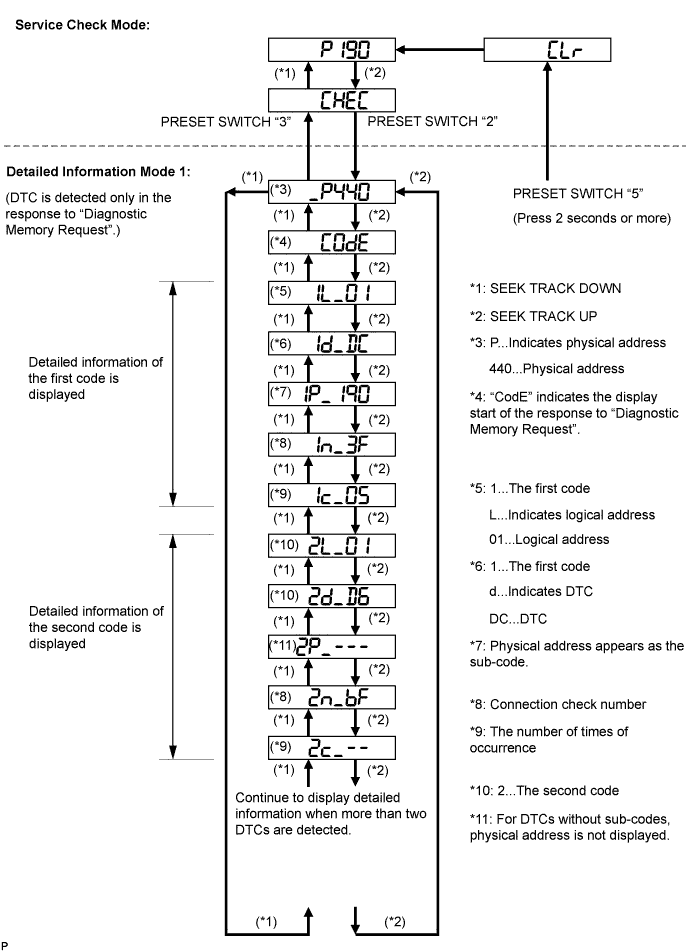
      1. "SyS" is displayed before the detailed codes detected as a result of "System Check Result Request" are displayed.
      2. "CodE" is displayed before the detailed codes detected as a result of "Diagnostic Memory Request" are displayed.

      HINT:
      1. The response to "System Check Result Request" is the current information given from each ECU as a result of the system check.
      2. The response to "Diagnostic Memory Request" contains the information received from each ECU or stored in each ECU in the past.
      3. The response to "Diagnostic Memory Request" is the DTCs received from each ECU or output DTCs as a result of the diagnostic memory check.
      4. "System Check Result Request (SyS)" is displayed first, and then the logical address and DTC appear in order.
      5. "Diagnostic Memory Request (CodE)" is displayed first, and then the logical address, DTC, sub-code, connection check number, and number of occurrence appear in order.


      E110919E02


  6. Detailed information mode 2

    HINT:
    1. "Detailed information mode 2" is displayed when DTCs are detected in the responses to both "System Check Result Request" and "Diagnostic Memory Request".
    2. The component device code (physical address) is displayed first, and then the check result follows.
    3. This illustration is only an example and may differ depending on option parts and output DTCs.


    1. Press the preset switch "2" to go to the "Detailed Information Mode 1".

    2. Press the "SEEK TRACK" switch to display the physical address and DTC of the component.

    3. Press the preset switch "3" to go to the "Service Check Mode".


    4. Distinguish between the displays of the responses to "System Check Result Request" and "Diagnostic Memory Request". In order to distinguish the information detected in "System Check Mode" and "Diagnostic Memory Mode" in "ECHn", "CHEC", and "old" in "Detailed Information Mode 1", refer to the following:
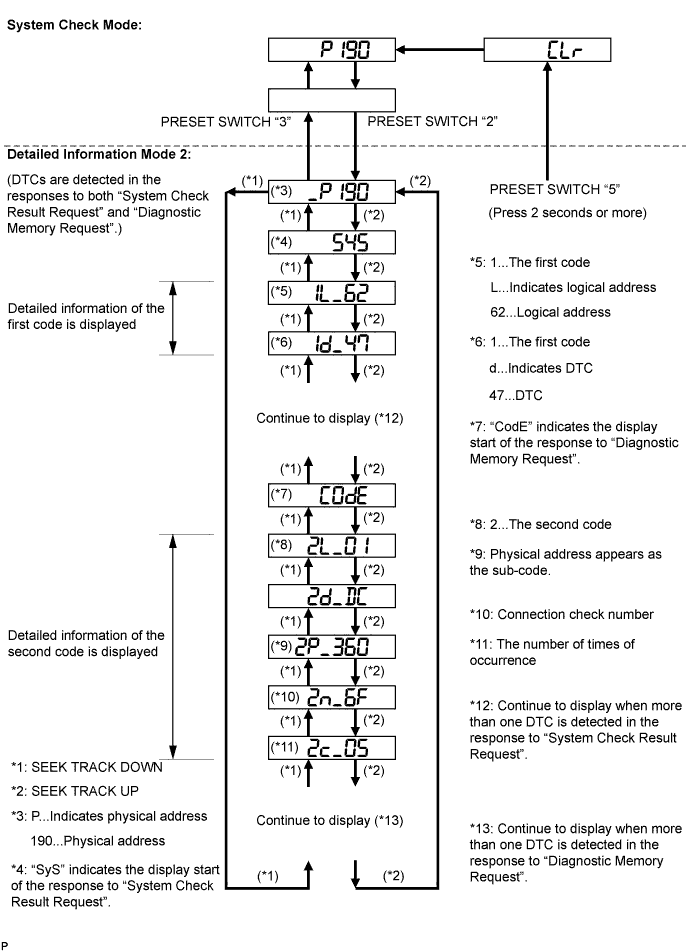
      1. "SyS" is displayed before the detailed codes detected as a result of "System Check Result Request" are displayed.
      2. "CodE" is displayed before the detailed codes detected as a result of "Diagnostic Memory Request" are displayed.

        HINT:
        1. The response to "System Check Result Request" is the current information given from each ECU as a result of the system check.
        2. The response to "Diagnostic Memory Request" contains the information received from each ECU or stored in each ECU in the past.
        3. The response to "Diagnostic Memory Request" is the DTCs received from each ECU or output DTCs as a result of the diagnostic memory check.
        4. "System Check Result Request (SyS)" is displayed first, and then the logical address and DTC appear in order.
        5. "Diagnostic Memory Request (CodE)" is displayed first, and then the logical address, DTC, sub-code, connection check number, and number of occurrence appear in order.


      E110918E02


DTC CLEAR/RECHECK


    E110878E01
  1. Clearing all DTC Memory (when clearing all the memory of the DTCs previously detected).

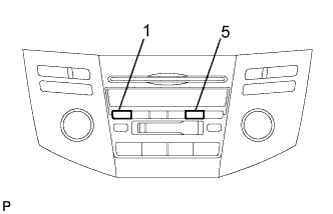
    1. When the preset switch "5" is pressed for 2 seconds or more during "Service Check Mode", the DTCs for all components are cleared. ("CLr" is displayed at this time.)

      HINT:
      1. A beep sound is emitted once when the DTC memory is completely cleared.
      2. When the DTC memory for all the components is cleared, only the component codes (physical address) are displayed.
      3. After the DTC memory is cleared, the "Service Check Mode" is restored.

  2. Clearing Individual DTC Memory (when clearing the memory of the DTC previously detected individually).

    1. When the preset switch "5" is pressed for 2 seconds or more during "Detailed Information Mode 1" or "Detailed Information Mode 2", the DTCs for the target component are cleared.

      HINT:
      1. A beep sound is emitted once when the DTC memory is completely cleared.
      2. When the DTC memory is cleared, only the component code (physical address) is displayed for target component.
      3. After the DTC memory is cleared, the "Service Check Mode" is restored.
      4. To check DTCs, press the preset switch "1" and perform the system check again.

  3. Press the preset switch "1" to perform the service check again, and check that no DTCs are displayed for all the component codes (physical address).