METER / GAUGE SYSTEM > Malfunction in Odo / Trip Switch |
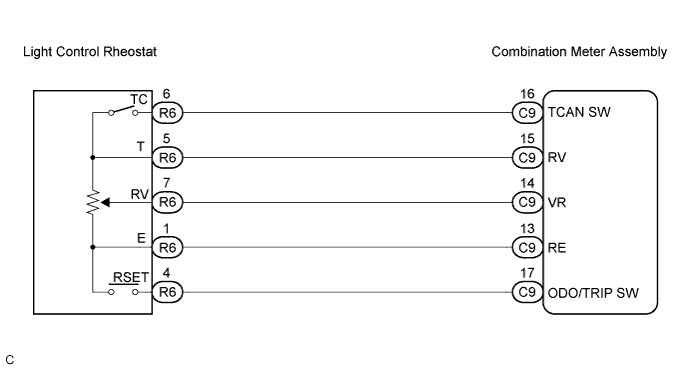
| 1.READ VALUE OF INTELLIGENT TESTER |
Operate the intelligent tester according to the steps on the display and select "DATA LIST".
| Item | Measurement Item/Range (Display) | Normal Condition | Diagnostic Note |
| ODO/TRIP Change Switch | ODO/TRIP switch is ON/OFF | ON: Switch is pushed OFF: Switch is not pushed | - |
|
| ||||
| OK | ||
 | ||
| ||
| 2.INSPECT ODO/TRIP SWITCH |
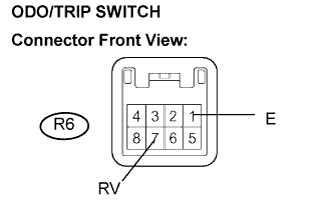 |
Remove the light ODO/TRIP switch with connector still connected.
Measure the resistance according to the value(s) in the table below.
| Tester Connection | Condition | Specified Condition |
| R6-1 (E) - R6-7 (RV) | ODO/TRIP switch OFF → ON | 10 kΩ or higher → Below 1 Ω |
|
| ||||
| OK | |
 |
| 3.CHECK HARNESS AND CONNECTOR (BETWEEN COMBINATION METER AND ODO/TRIP SWITCH) |
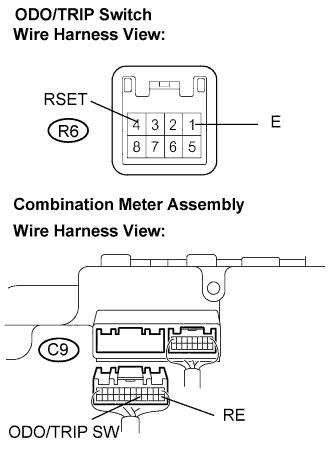 |
Disconnect the C9 and R6 connectors.
Measure the resistance according to the value(s) in the table below.
| Tester connection | Condition | Specified condition |
| C9-13 (RE) - R6-1 (E) | Always | Below 1 Ω |
| C9-17 (ODO/TRIP SW) - R6-4 (RSET) | Always | Below 1 Ω |
|
| ||||
| OK | ||
| ||
| ||


