DTC 01-DF Master Error |
| DTC No. | DTC Detection Condition | Trouble Areas |
| 01-DF *1 | The device with a display fails and the master is switched to the audio device Also when a communication error between sub-master (radio receiver) and master occurs, this code is stored |
|
| 1.CHECK MULTI-DISPLAY POWER SOURCE CIRCUIT |
| NEXT | |
 |
| 2.INSPECT RADIO RECEIVER |
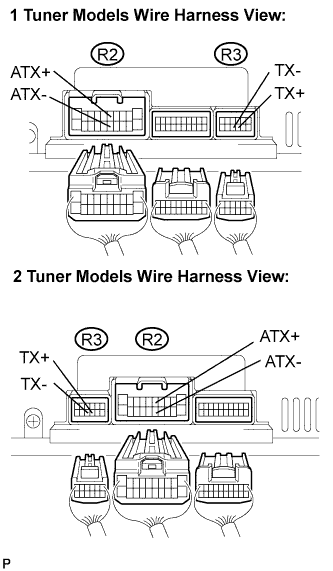 |
Disconnect the radio receiver connectors.
Measure the resistance according to the value(s) in the table below.
| Tester Connection | Condition | Specified Condition |
| ATX+ (R2-5) - ATX- (R2-15) | Always | 60 to 80 Ω |
| TX+ (R3-9) - TX- (R3-10) | Always | 60 to 80 Ω |
|
| ||||
| OK | |
|
| 3.IDENTIFY THE COMPONENT WHICH HAS STORED THIS CODE |
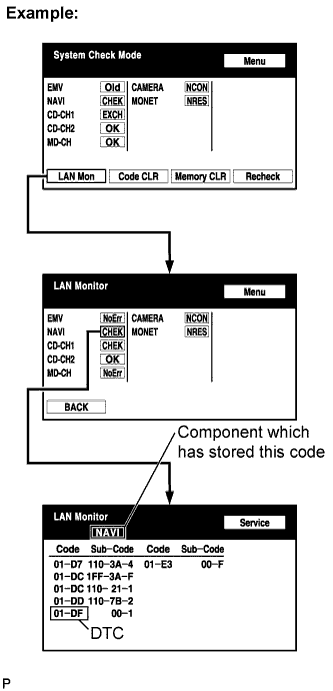 |
Enter the diagnostic mode.
Press the "LAN Mon" switch to change to "LAN Monitor" mode.
Identify the component which has stored this code.
| Display | Component |
| AUDIO H/U | Radio Receiver |
| DSP-AMP | Stereo Component Amplifier |
| G/W | Gateway ECU |
| NAVI | Navigation ECU |
| CAMERA | Television Camera ECU |
| NEXT | |
|
| 4.CHECK HARNESS AND CONNECTOR (MULTI-DISPLAY - COMPONENT WHICH HAS STORED THIS CODE) |
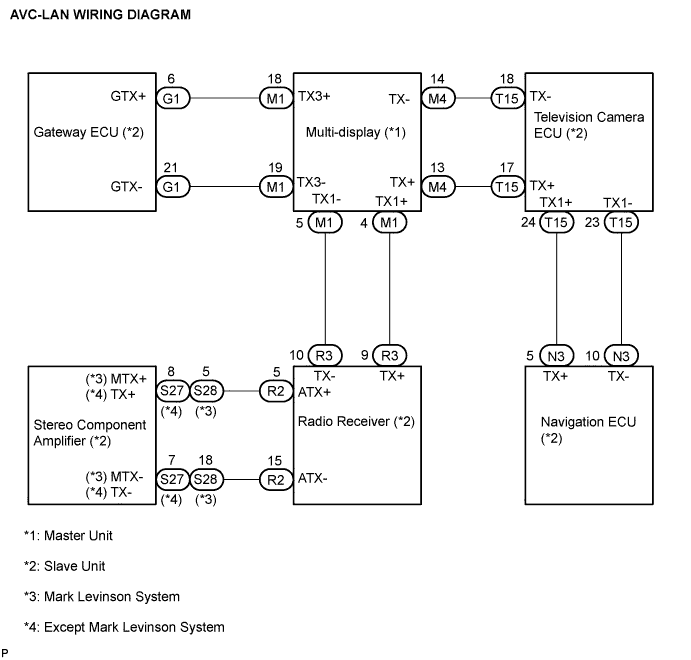
Referring to the AVC-LAN wiring diagram below, check the AVC-LAN circuit between the multi-display and the component which has stored this code.
Check for an open or short in the AVC-LAN circuit between the multi-display and the component which has stored this code.
|
| ||||
| OK | |
|
| 5.CHECK HARNESS AND CONNECTOR (MULTI-DISPLAY - RADIO RECEIVER) |
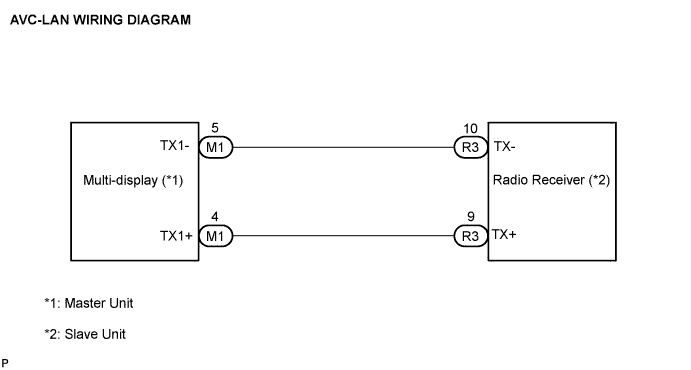
Referring to the AVC-LAN wiring diagram below, check the AVC-LAN circuit between the multi-display and the radio receiver.
Check for an open or short in the AVC-LAN circuit between the multi-display and the radio receiver.
|
| ||||
| OK | |
|
| 6.REPLACE MULTI-DISPLAY |
Replace the multi-display with a normal one and check if the same problem occurs again.
|
| ||||
| OK | ||
 | ||
| ||

