DTC 01-DC Transmission Error |
| DTC No. | DTC Detection Condition | Trouble Areas |
| 01-DC *1 | Transmission to component shown by sub-code failed (Detecting this DTC does not always mean actual failure) | If the same sub-code is recorded in other components, check harness for power supply and communication system of all components shown by code |
| 1.CHECK FOR DTC OF OTHER COMPONENTS |
Check if the component shown by the sub-code is displayed in the check result of the other components.
Check if "01-DC" is output for the other components.
If "01-DC" is output for any other components, check if the same physical address is displayed.
| Result | Proceed to |
| "01-DC" is output and the same physical address is displayed | A |
| "01-DC" is not output or the same physical address is not displayed | B |
|
| ||||
| A | |
 |
| 2.IDENTIFY THE COMPONENT WHICH HAS STORED THIS CODE |
Enter the diagnostic mode.
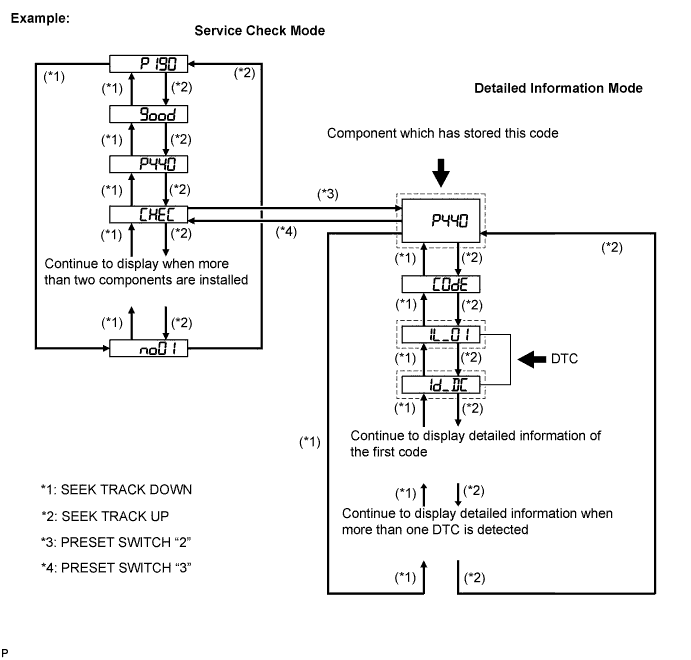
Press the preset switch "3" to change to "Detailed Information Mode".
Identify the component which has stored this code.
| Component | Physical address |
| Gateway ECU | 1C6 |
| Stereo Component Amplifier | 440 |
| Radio receiver | 190 |
| NEXT | |
|
| 3.CHECK COMPONENT WHICH HAS STORED THIS CODE |
Select the component which has stored this code.
| Component | Proceed to |
| Gateway ECU | Gateway ECU communication error (Click here) |
| Stereo Component Amplifier | Stereo component amplifier communication error (Click here) |
| Radio receiver | Radio receiver communication error (Click here) |
| NEXT | ||
 | ||
| ||
| 4.CLEAR DTC |
Clear the DTC (Click here).
| NEXT | |
|
| 5.RECHECK DTC |
Recheck the DTC and check if the same trouble code occurs again.
|
| ||||
| OK | ||
| ||
| ||

