NAVIGATION SYSTEM > RDS-TMC does not Function

for Preparation Click here


INSPECTION PROCEDURE

HINT:
  1. RDS-TMC function settings can be changed by the user.
  1. Before troubleshooting, check the settings on the menu screen of the navigation system, and confirm that the relevant item settings are correct.
  1. The RDS-TMC function of the navigation system operates in the same way as the radio, according to the radio wave received by the radio receiver. It is therefore necessary to also check that the RDS-TMC function of the radio receiver is normal.
  1. A short period of time may be required to update RDS-TMC signals depending on the radio wave reception conditions.

1.CHECK RDS-TMC STATION


    I045959E01
  1. Turn the audio system on and move the vehicle to a location where radio wave reception is possible.

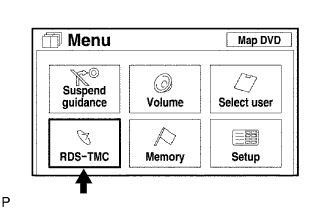
  1. Enter the "Menu" screen by pressing the "Menu" switch.

  1. Enter the "RDS-TMC" screen by pressing the "RDS-TMC" switch.


    I045960E02
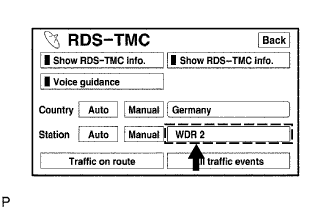
  1. Check if an RDS-TMC station is selected

    OK:
    An RDS-TMC station is selected.


OK
REPLACE NAVIGATION ECU
NG


2.CHECK RDS-TMC STATION SETTING


    I045960E01
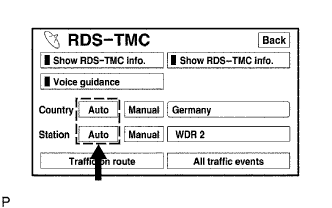
  1. Set the country and station to "Auto".

  1. Check if an RDS-TMC station is automatically selected.

    HINT:
    1. The RDS-TMC system automatically selects the strongest RDS-TMC station.
    2. A short period of time may be required before an RDS-TMC station is selected.

    OK:
    The strongest RDS-TMC station is selected.


OK
NORMAL OPERATION
NG


3.CHECK RADIO RECEIVER
  1. Check if the RDS-TMC function of the radio receiver operates normally.

    OK:
    The RDS-TMC function operates normally.


NG
REPLACE RADIO RECEIVER
OK

RETURN TO THE ORIGINAL INSPECTION FLOW BECAUSE THE CHECK RESULT IS NORMAL