CUSTOMIZE PARAMETERS
Troubleshooting
- HINT:
- The following items can be customized.
- NOTICE:
- When the customer requests a change in a function, first make sure that the function can be customized.
- Be sure to make a note of the current settings before customizing.
- When troubleshooting a function, first make sure that the function is set to the default setting.
- When the customer requests a change in a function, first make sure that the function can be customized.
| POWER TILT AND POWER TELESCOPIC STEERING COLUMN |
- HINT:
- The following can be customized.
- NOTICE:
- Be sure to record the current value before customizing.
- When troubleshooting, be careful, as customizing could turn off the function (Example: If the wireless operation does not function, check that it has not been turned off by customizing).
- Be sure to record the current value before customizing.
- Tilt & Telesco:
DISPLAY
DEFAULT
CONTENTS
SETTING
Autoaway/Return Function
ON
ON/OFF of the auto away/return function
ON/OFF
| AIR CONDITIONING SYSTEM |
- HINT:
- The following items can be customized.
- NOTICE:
- After confirming whether the items of the customer's request are applicable or not for the customized items, perform the customize operation.
- Be sure to record the current value before customizing.
- In case of performing the troubleshooting, pay attention as there is a possibility that the function is set to OFF by customizing (Example: In case of the symptom in which "The wireless operation does not function" is displayed, check that the wireless operation is not set to OFF by customizing, then perform the troubleshooting).
- After confirming whether the items of the customer's request are applicable or not for the customized items, perform the customize operation.
| DISPLAY (ITEM) |
DEFAULT |
CONTENTS |
SETTING |
| Shift Set Temperature (Set Temp Shift) |
NORMAL |
To control with the shifted temperature against the display temperature. |
+2C / +1C / NORMAL / -1C / -2C |
| Air Inlet Mode (Air Inlet Mode) |
AUTO |
In case of turning the A/C ON when you desire to make the compartment cool down quickly, this is the function to change the mode automatically to RECIRCULATED mode. |
MANUAL / AUTO |
| Compressor Mode (Compressor Mode) |
AUTO |
Function to turn the A/C ON automatically by pressing the AUTO button when the blower is ON and the A/C is OFF. |
MANUAL / AUTO |
| Compressor / DEF Mode (Comprs / DEF oper) |
LINK |
Function to turn the A/C ON automatically linking with the FRONT DEF button when the A/C is OFF. |
NORMAL / LINK |
| Foot / DEF Auto Mode (Foot/DEF Mode) |
ON |
Function to turn the air flow from FOOT/DEF to ON automatically when AUTO MODE is ON. |
OFF / ON |
| Foot / DEF Auto Blow Up (Auto Blow Up) |
ON |
Function to switch the blower level automatically when the defroster is ON. |
OFF / ON |
| Ambient Temperature Shift (Ambient Tmp Sft) |
NORMAL |
To control with the shifted ambient temperature against the display ambient temperature. |
+3C / +2C / +1C / NORMAL / -1C / -2C / -3C |
| THEFT DETERRENT SYSTEM |
- HINT:
- The following items can be customized.
- NOTICE:
- After confirming whether the items requested by the customer are applicable or not for customization, perform customizing operations.
- Be sure to record the current settings before customization.
- When troubleshooting, make sure that the item in question is not set to "OFF" as a result of customization (Example: For the system, "the wireless function does not operate", first check that the wireless function is not set to "OFF", then perform troubleshooting).
- After confirming whether the items requested by the customer are applicable or not for customization, perform customizing operations.
| DISPLAY (ITEM) |
DEFAULT |
CONTENTS |
SETTING |
| Warning by Horn |
ON |
Function that makes vehicle horn able to be used as a warning device |
ON/OFF |
| LIGHTING SYSTEM |
**2: Delay time until the headlight is turned on when it suddenly gets dark.
- HINT:
- The followings are the possible items to be customized.
- NOTICE:
- After confirming whether the items of the customer's request is applicable or not for the customized items, perform the customize operation.
- Be sure to record the current value before customizing.
- In case of performing the troubleshooting, pay attention as there is a possibility that the function is OFF by customizing (Example: In case of the symptom in which "The wireless operation does not function", check that the wireless operation is not OFF by customizing, then perform the troubleshooting.).
- After confirming whether the items of the customer's request is applicable or not for the customized items, perform the customize operation.
| DISPLAY (ITEM) |
DEFAULT |
CONTENTS |
SETTING |
| Lighting Time |
15 s |
To change the lighting time after closing the door. (It will quickly fade out in case of turning the ignition ON.) |
7.5 s / 15 s / 30 s |
| Operation of Illumination System |
ON |
Function to light up the step light, center console light and door inside handle light when one of the following occurs; the ignition turned ON, door unlock or door open. |
ON / OFF |
| Light Control) |
ON |
Function to light up the step light and door inside handle light when the ignition switch is ON and the shift position is not P. |
ON / OFF |
| I/L ON W/Door Key Unlock |
ON |
Function to light up the interior light*, ignition light and step light when unlocking with the door key cylinder. *: Interior light comes on when the interior light switch is at the DOOR position. |
ON / OFF |
| I/L when ACC OFF |
ON |
Function to light the interior light* and door courtesy light when the ignition switch is operated from "ACC" to "LOCK". *: interior light comes on when the interior light switch is at the DOOR position. |
ON / OFF |
| DISPLAY (ITEM) |
DEFAULT |
CONTENTS |
SETTING |
| Light Auto OFF Delay |
30 s |
Function to keep on lighting the headlight for a certain period of time after closing all the doors with the ignition switch turned OFF from ON under the condition that the light control switch is at HEAD or AUTO with the headlight ON. |
OFF / 30 s / 60 s / 90 s |
| Light control type |
CURRENT |
To change the control logic when the light control switch is AUTO position. Refer to the *1 illustration. |
CURRENT / OLD |
| Turn ON luminous intensity |
NORMAL |
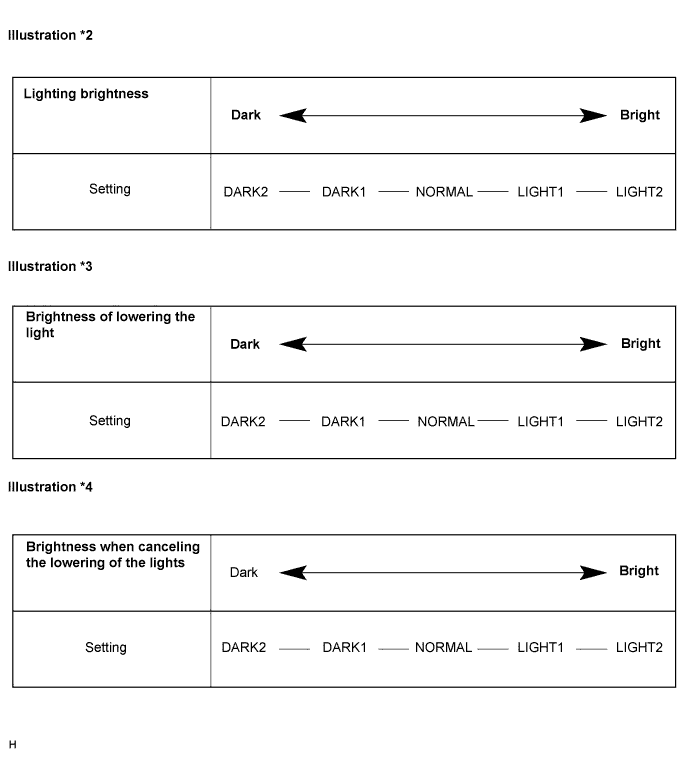
To adjust the sensitivity of the lighting illumination. Refer to the *2 illustration. |
DARK2 / DARK1 / NORMAL / LIGHT1 / LIGHT2 |
| Display extinction ON sensitivity |
NORMAL |
To change the brightness of lowering the lights such as the indicator light of the combination meter, A/C indicator light, clock. Refer to *3 illustration. |
DARK2 / DARK1 / NORMAL / LIGHT1 / LIGHT2 |
| Display extinction OFF sensitivity |
NORMAL |
To change the brightness of canceling the lowering the lights such as the indicator light of the combination meter, A/C indicator light, clock. Refer to *4 illustration. |
DARK2 / DARK1 / NORMAL / LIGHT1 / LIGHT2 |
- HINT:
- Sensitivity adjustment can hardly be confirmed. Please check by customer's actual driving.
| Brightness of the surrounding when lighting |
Lighting delay |
Delay of turning light off |
**2 |
|
| OLD |
Old logic |
6 sec. |
6 sec. |
3 sec. |
| CURRENT |
New logic **1 ('97/8-) |
15 sec. |
15 sec. |
15 sec. |

| WIPER AND WASHER SYSTEM |
- HINT:
- The following items can be customized.
- NOTICE:
- After confirming whether the items of the customer's request is applicable or not for the customized items, perform the customize operation.
- Be sure to record the current value before customizing.
- In case of performing the troubleshooting, pay attention as there is a possibility that the function is OFF by customizing. (Example: In case of the symptom in which "The wireless operation does not function", check that the wireless operation is not OFF by customizing, then perform the troubleshooting.)
- After confirming whether the items of the customer's request is applicable or not for the customized items, perform the customize operation.
| Display (Item) |
Default |
Contents |
Setting |
| SPEED MODE (Speed mode) |
Avail |
Function to change to the intermittent operation when the vehicle comes to a stop ( 0 vehicle speed) from running condition in case that the wiper switch is at the LO position. |
NOT AVAIL / AVAIL |
| AUTO WIPER (Auto wiper) |
Avail |
Function to operate the wiper automatically when it is raining. |
NOT AVAIL / AVAIL |
| REWIPE CONTROL (Rewipe control) |
SPD MOD |
Function to change time until operating the wiper to prevent dropping after having used the washer. |
OFF / 3 s / SPD MOD |
| POWER DOOR LOCK CONTROL SYSTEM |
CUSTOMIZING FUNCTION WITH INTELLIGENT TESTER (REFERENCE)
- HINT:
- The following items can be customized.
- NOTICE:
- After confirming whether the items requested by the customer are applicable or not for customization, perform customizing operations.
- Be sure to record the current settings before customization.
- When troubleshooting, make sure that the item in question is not set to "OFF" as a result of customization.
Body ECU Display
(Item)
Default
Contents
Setting
Auto Lock Time
30s
Function that selects AUTO LOCK time (30 sec. or 60 sec.)
30s/60s
All Unlock/Open-Close
(All unlock w/ D door open-close)
OFF
Function that unlocks all other doors when opening driver side door within 10 seconds after turning the ignition switch off from ON
ON/OFF
- After confirming whether the items requested by the customer are applicable or not for customization, perform customizing operations.
| WIRELESS DOOR LOCK CONTROL SYSTEM |
- HINT:
- The following items can be customized.
- NOTICE:
- When the customer requests a change in a function, first make sure that customization of the function(s) is possible.
- Be sure to record the current settings before customizing.
- When troubleshooting a function, first make sure that the function is not set to OFF.
- When the customer requests a change in a function, first make sure that customization of the function(s) is possible.
| Item (Display) |
Default |
Contents |
Setting |
| Open Door Warning (Open door warning) |
ON |
If a door is not completely closed and LOCK is pressed, this function sounds a buzzer for 10 seconds. |
ON / OFF |
| Wireless Buzzer Resp (Buzzer answer-back of Wireless) |
ON |
This function makes the wireless door lock buzzer sound for answer-back when LOCK/UNLOCK is pressed. |
ON / OFF |
| Wireless Control (Wireless door lock control function) |
ON |
This function turns the wireless door lock function on or off. |
ON / OFF |
| Auto Lock Time (Auto lock time) |
30 s |
This function controls the amount of time from unlocking doors to automatic re-locking. |
30 s / 60 s |
| Hazard Answer Back (Hazards answer-back for wireless door lock operation) |
ON |
When LOCK is pressed, all hazard warning lights flash once. When UNLOCK is pressed, all hazard warning lights flash twice. |
ON / OFF |
| METER / GAUGE SYSTEM |
Buzzer ON/OFF Setting

The buzzer ON/OFF setting, which is a setting of the buzzer function of the combination meter, can disable the driver side seat belt buzzer and front passenger side seat belt buzzer.- NOTICE:
- Basically, these buzzers should be set on for safe driving. Perform the procedures only if it is necessary to set the buzzer off.
*: "SEAT BELT BUZZER OFF" indicates that the buzzer is OFF. "SEAT BELT BUZZER ON" indicates that the buzzer is ON. The buzzer ON/OFF setting will be finished (the odometer will display "ODO") if the ODO/TRIP switch is not operated for 10 seconds or more. In this case, perform step 11 to check that the buzzer ON/OFF setting is complete. If it is not complete, start from step 1 again.PROCEDURE Steps
Driver Side and Passenger Side Seat Belt Buzzer
Front Passenger Side Seat Belt Buzzer
1
Turn the ignition switch to the ON position.
Turn the ignition switch to the ON position.
2
Press the ODO/TRIP switch until the odometer displays "ODO".
Press the ODO/TRIP switch until the odometer displays "ODO".
3
Turn the ignition switch off.
Turn the ignition switch off.
4
Turn the ignition switch to the ON position.
Turn the ignition switch to the ON position.
5
Press the ODO/TRIP switch immedeately (within 6 seconds) and hold it down for 10 seconds or more.
Sit in the front passenger seat. Press the ODO/TRIP switch immediately (within 6 seconds) and hold it down for 10 seconds or more.
6
Continue holding down the ODO/TRIP switch and fasten the driver side seat belt.
Continue holding down the ODO/TRIP switch, fasten and release the passenger side seat belt.
7
Check that the odometer displays either "SEAT BELT BUZZER ON" or "SEAT BELT BUZZER OFF"
Check that the odometer displays either "SEAT BELT BUZZER ON" or "SEAT BELT BUZZER OFF"
8
Press the ODO/TRIP switch to change the display to "SEAT BELT BUZZER OFF".
Press the ODO/TRIP switch to change the display to "SEAT BELT BUZZER OFF".
9
Turn the ignition switch off.
Turn the ignition switch off.
10
Turn the ignition switch to the ON position.
Turn the ignition switch to the ON position.
11
Check that no buzzer sounds.
Check that no buzzer sounds.
- NOTICE:
- When either the battery cable or the combination meter connector is disconnected, these buzzers are set on.
OTHER PARAMETERS (Using Intelligent Tester)
- HINT:
- The following items can be customized.
- NOTICE:
- Be sure to record the current value before customizing.
- When performing troubleshooting, be aware that the functions may be set to OFF by customizing. (Example: In case of the symptom in which "The wireless operation does not function", check that the wireless operation is not set to OFF by customizing, then perform the troubleshooting.)
- Be sure to record the current value before customizing.
METER Display (Item)
Default
Contents
Setting
KEY REMND SOUND
NORMAL
Function to change cycle of key remind warning buzzer.
600 / 900 / 1,200 ms
| POWER WINDOW CONTROL SYSTEM |
- HINT:
- The following items can be customized.
- NOTICE:
- After confirming whether the items requested by the customer are applicable or not for customization, perform customize operations.
- Be sure to record the current settings before customizing.
- When troubleshooting, make sure that the item in question is not set to "OFF" as a result of customization. (Example: For the symptom "the wireless function does not operate", first check that the wireless function is not set to "OFF", then perform troubleshooting).
- After confirming whether the items requested by the customer are applicable or not for customization, perform customize operations.
- POWER WINDOW:
DISPLAY (ITEM)
DEFAULT CONTENTS
CONTENTS
SETTING
UP/DOOR KEY (Door key linked P/W UP)
ON
Function that enables all power windows to move up manually, via manual operation, when driver side door key cylinder is held in lock position for 1.5 seconds when ignition switch is off.
ON/OFF
DOWN/DOOR KEY (Door key linked P/W DOWN)
ON
Function that enables all power windows to move down manually, via manual operation, when driver side door key cylinder is held in unlock position for 1.5 seconds when ignition switch is off.
ON/OFF
DOWN/WIRELESS (P/W DOWN w/ transmitter)
ON
Function that enables all power windows to move down manually, via manual operation, when unlock switch on transmitter is held for 1.5 seconds when ignition switch is off.
ON/OFF
UP/WIRELESS (P/W UP w/ transmitter)
ON
Function that enables all power windows to move up manually, via manual operation, when lock switch on transmitter is held for 1.5 seconds when ignition switch is off.
ON/OFF
| POWER BACK DOOR SYSTEM |
- HINT:
- The following items can be customized.
- NOTICE:
- After confirming whether the items requested by the customer are applicable or not for customization, perform customizing operations.
- Be sure to record the current settings before customizing.
- When troubleshooting, make sure that the item in question is not set to "OFF" as a result of customization.
- After confirming whether the items requested by the customer are applicable or not for customization, perform customizing operations.
| DISPLAY (ITEM) |
DEFAULT |
CONTENTS |
SETTING |
| PBD SW Operation |
0.8s |
Function that turns power back door closer switch ON when switch is pushed once or held down for 0.8 sec. |
0.8s/ON |
| PBD Buzzer Volume |
LARGE |
Function that adjusts the volume of warning buzzer that notifies power back door is operating |
OFF/SMALL/LARGE |
| Wireless PBD Operation |
0.8s |
Function that operates power back door when transmitter switch is pressed in specified way (1-press, 2-presses, 0.8 sec.-press or OFF*1) |
ON/TWICE ON/0.8s/OFF |
| PBD Assist Open*2 |
OFF |
Function that helps power back door opening operation |
ON/OFF |
- HINT:
- *1: Wireless (transmitter switch) operation of the power back door is disabled.
- *2: When this item is set to ON:
When the back door is fully closed, pulling the back door opener switch (outside handle switch) activates the power back door system to automatically open the back door after it is unlatched.
- *1: Wireless (transmitter switch) operation of the power back door is disabled.
| SLIDING ROOF SYSTEM |
CUSTOMIZING FUNCTION WITH INTELLIGENT TESTER (REFERENCE)
- HINT:
- The following items can be customized.
- NOTICE:
- When the customer requests a change in a function, first make sure that the function can be customized.
- Be sure to make a note of the current settings before customizing.
- When troubleshooting a function, first make sure that the function is set to the default setting.
- When the customer requests a change in a function, first make sure that the function can be customized.
Sliding roof ECU Display (Item)
Default
Contents
Setting
OPEN/DOOR KEY
(Door key related OPEN)
ON
Function to manually open sliding roof linked with power window if holding driver side door key for 1.5 seconds or more to unlock position when engine switch is off
ON/OFF
CLOSE/DOOR KEY
(Door key related CLOSE)
ON
Function to manually close sliding roof linked with power window if holding driver side door key for 1.5 seconds or more to lock position when engine switch is off
ON/OFF
OPEN/WIRELESS
(Wireless key related OPEN)
ON
Function to manually open sliding roof linked with power window if pressing transmitter UNLOCK switch for 1.5 seconds or more when engine switch is off
ON/OFF
DOOR KEY OPER
(Door key related operation)
SLIDE
Function to select tilt up or slide open of manual sliding roof operation linked with power window
Activate by holding driver side door key for 1.5 seconds or more to unlock position when engine switch is off
TILT/SLIDE
WIRELESS OPER
(Wireless key related operation)
SLIDE
Function to select tilt up or slide open of manual sliding roof operation linked with power window
Activate by pressing on transmitter UNLOCK switch for 1.5 seconds or more when engine switch is off
TILT/SLIDE