INSTALLATION
Removal / installation
| 1. INSTALL BRAKE CONTROL POWER SUPPLY |

Install the 2 brackets with the 4 bolts.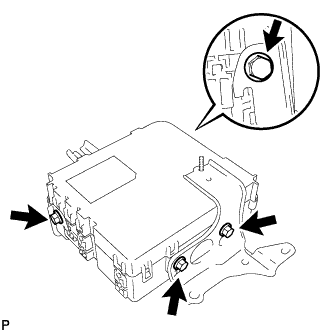

- Torque:
- 5.0 N*m{ 51 kgf*cm , 44 in.*lbf }
Install the brake control power supply with the 3 nuts.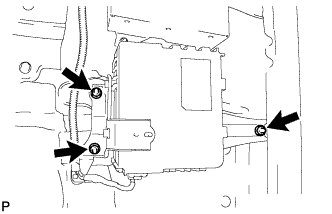
- Torque:
- 5.0 N*m{ 51 kgf*cm , 44 in.*lbf }
Connect the brake control power supply connector and install the clamp.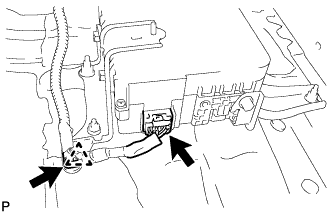
| 2. INSTALL DECK BOARD NO.1 CHECK |
Install the deck board No.1 check with the 4 nuts.
| 3. INSTALL DECK SIDE TRIM BOX RH |
| 4. INSTALL DECK SIDE TRIM BOX LH |
Install the deck side trim box with the 2 clips.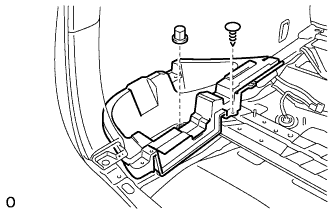
| 5. INSTALL REAR FLOOR FINISH PLATE |
Engage the 2 claws and 6 clips, and install the rear floor finish plate.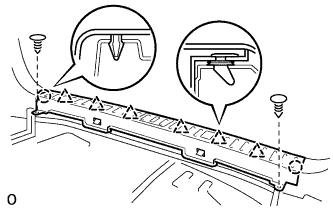
Install the 2 clips.
| 6. INSTALL DECK BOARD NO.2 SUB-ASSEMBLY |
Install the deck No.2 board sub-assembly with the 4 bolts and 2 nuts.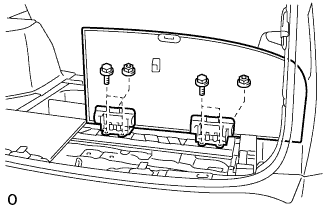
| 7. INSTALL DECK BOARD NO.3 SUB-ASSEMBLY |
Install the deck No.3 board sub-assembly with the 2 bolts and 2 nuts.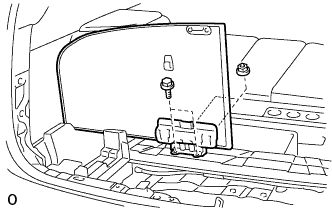
| 8. INSTALL DECK FLOOR BOX REAR |
Install the deck floor box rear with the 2 clips.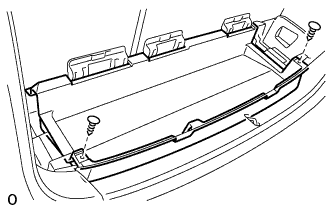
| 9. INSTALL DECK FLOOR BOX FRONT |
Install the deck floor box front with the 2 clips.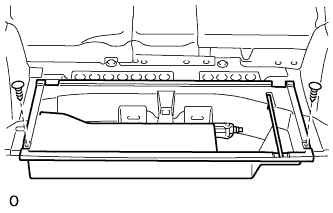
| 10. INSTALL DECK BOARD SUB-ASSEMBLY |
Install the deck board sub-assembly with the 2 bolt.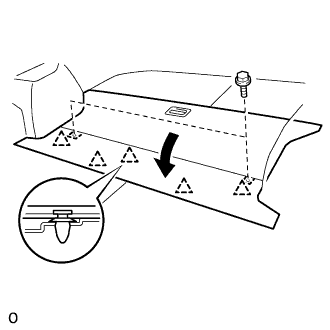
Engage the 5 clips.
| 11. CHECK AND CLEAR DTC |
| 12. PERFORM INITIALIZATION |
Some systems need initialization after reconnecting the cable to the negative battery terminal.