DTC CHECK / CLEAR
Troubleshooting
| CHECK DTC (HV CONTROL ECU) |
Connect the intelligent tester to the DLC3.
Turn the ignition switch to the ON position.
Turn the intelligent tester ON.
On the System Select screen, enter the following menus: Powertrain / Hybrid Control / DTC. Read DTCs of the HV control system.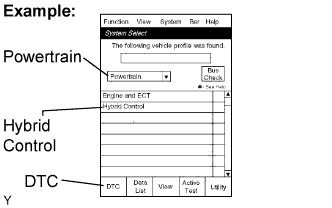

| CHECK FREEZE FRAME DATA AND INFORMATION |
If a DTC is present, select that DTC in order to display its freeze frame data.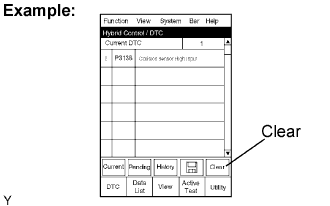
Read freeze frame data recorded when the DTC was set.
- NOTICE:
- Information code (INF code) is displayed in one of the columns, detail code 1 to 5, on the freeze frame data screen. Check the details by following the procedures in the following steps.
- HINT:
- In the case shown in the illustration, refer to troubleshooting for DTC P3138 and INF code 349.
Read the information.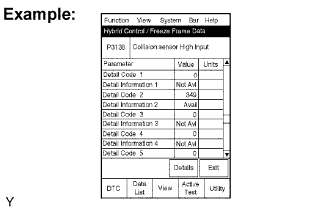
Select Detail Information beneath Detail Code which has an INF code.
- HINT:
- Detail Code 2 has the INF code 349 in the illustration. In this case, Detail Information 2 should be selected.
Press the "Details" key.
Information is displayed as shown in the illustration.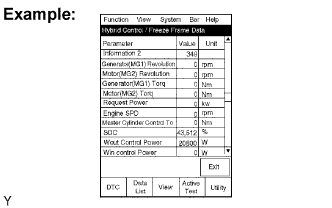
| CHECK DTC (BUS CHECK) |
On the System Select screen, select Bus Check.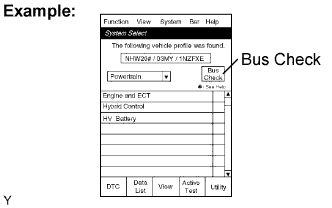
On the Bus Check screen, select Communication Malfunction DTC, in order to read the DTCs for a communication error.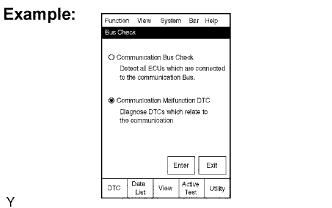
- HINT:
- If DTCs for the CAN communication system are present in addition to other DTCs, first troubleshoot and repair malfunction in the CAN communication. (Click here)
| CHECK DTC (SYSTEMS OTHER THAN HV CONTROL ECU) |
- HINT:
- The HV control ECU maintains mutual communication with the computers, including the ECM, battery ECU, skid control ECU, power steering ECU and other. Therefore, if the HV control ECU outputs a warning, it is necessary to check and record the DTCs of all the systems.
On the System Select screen, enter the following menus: Utility / All Codes.
If DTCs are present, check the relevant systems.
| CLEAR DTC |
- NOTICE:
- Clearing the DTCs will also clear the freeze frame data, information (Click here) and operation history data (Click here).
Connect the intelligent tester to the DLC3.
Turn the ignition switch to the ON position and turn the intelligent tester on.
Check that the shift position is in the P position.
Display the Hybrid Control / DTC screen and press the Clear key at the bottom right area of the screen.
- NOTICE:
- Clearing the DTCs will also clear the freeze frame data, information (Click here) and operation history data (Click here).