62-46
Diagnostic trouble codes
DESCRIPTION
| DTC No. |
DTC Detection Condition |
Trouble Areas |
| 62-46 |
Scratches or dirt is found on CD surface or CD is set upside down. |
|
| 63-46 |
Scratches or dirt is found on CD surface or CD is set upside down. |
INSPECTION PROCEDURE
- HINT:
- After the inspection is completed, clear the DTCs.
| 1. CHECK THAT CD IS INSERTED PROPERLY |

Check whether or not the CD is inserted upside down.
- OK:
- CD is properly inserted.
|
|
||||

| OK | |
 |
| 2. DISC CLEANING |
Disc cleaning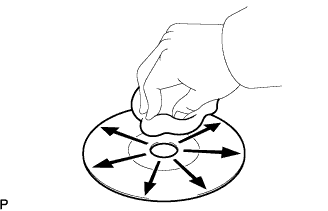

If dirt is on the disc surface, wipe it with a soft cloth from inside to outside in a radial direction.
- NOTICE:
- Do not use conventional record cleaner or anti-static preservative.
| NEXT | |
|
| 3. CHECK DISC |
Check that the disc is not deformed or cracked.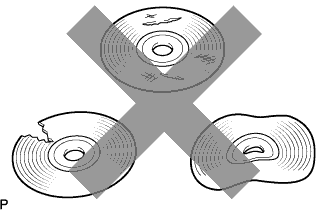
- OK:
- No deformation or cracks on the disc.
|
|
||||
| OK | |
|
| 4. REPLACE DISC WITH ANOTHER AND RECHECK |
Replace the disc with another and recheck.
Replace the disc with another normal one.
Clear the DTC (Click here).
Recheck DTCs and check if the same trouble occurs again.
- OK:
- Malfunction disappears.
|
|
||||
| OK | ||
 |
||
| ||