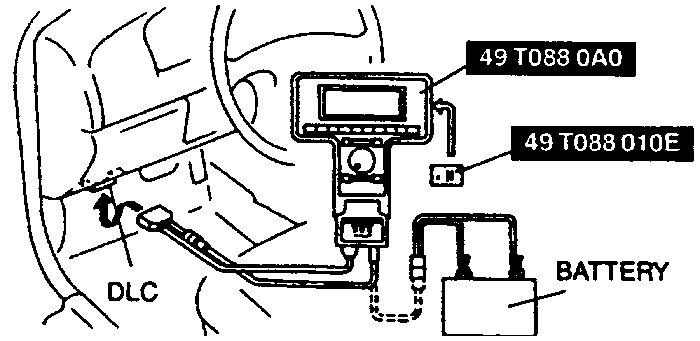
| Fig. 1: Data Link Connector (DLC) face for B Series Pick-up
models
|
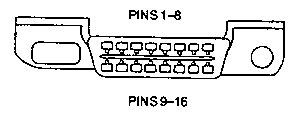
| Fig. 2: Correct hook up of scan tool for the B Series
Pick-up
|
The 1995–98 B Series Pick-up models utilize On Board Diagnostic II (OBD-II)
Diagnostic Trouble Codes (DTC's), which are alpha-numeric (they use letters
and numbers). The letters in the OBD-II DTC's make it highly difficult to convey
the codes through the use of anything but a scan tool. Therefore, to read the
OBD-II DTC's on these vehicles it is necessary to utilize an OBD-II compatible
scan tool.
- Ensure that the ignition switch is in the OFF position.
- Apply the parking brake.
- Ensure that transmission gearshift is in either Park (automatic transmissions)
or Neutral (manual transmissions).
- Block the rear wheels.
- Turn off all electrical loads, such as the heater blower motor, the radio,
the rear defroster, etc.
- Connect the scan tool to the Data Link Connector. Make certain the test
button on the scan tool is unlatched or up.
- Turn the ignition switch to the ON position without starting
the engine (KOEO).
- Using the scan tool, retrieve and record any continuous memory DTC's.
- Turn the ignition switch to the OFF position.
- Start the engine and run it until normal operating temperature is reached.
- Turn the engine OFF and wait 10 seconds.
- Turn the ignition switch ON but do not start the engine.
- Activate the KOEO self-test. Retrieve and record any KOEO DTC's after the
KOEO test is complete.
NOTE: Ignore DTC 1000.
- If any DTC's were present, refer to the accompanying OBD-II charts to locate
the problem(s).