Disconnect the negative (-) battery cable from the battery.
Pull all of the knobs off of the heater control panel levers. Note which
knob goes where.
Remove the glove box stopper and either remove the glove box assembly totally
or just swing it down and out of the way.
Remove the retaining screws holding the center panel in place, then pull
the center panel off of the instrument panel (dashboard).
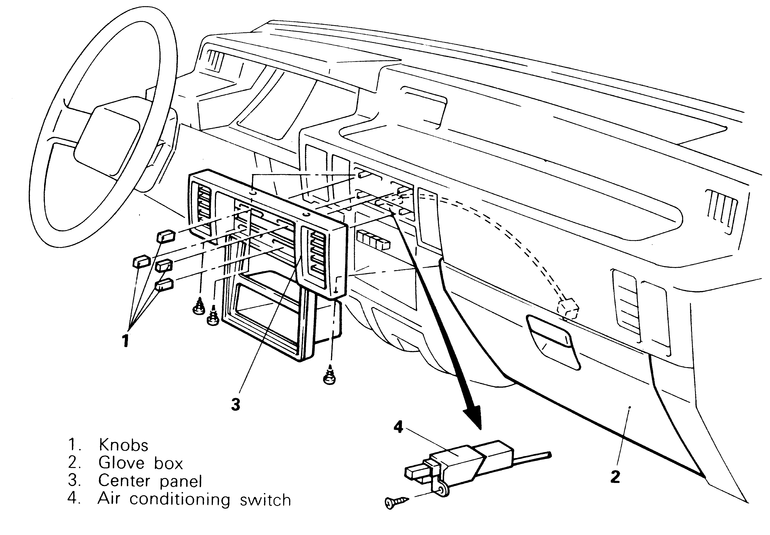
Fig. 1: Air conditioning switch removal and installation
components — 1987–95 Pick-ups
Reach in through the glove box hole and unplug the air conditioner switch
wire connector.
Unscrew the two air conditioner mounting screws and draw the A/C switch
and its wire out the front. It may be necessary to loosen the screws holding
the heater control panel in place so that the panel can be lifted slightly
to allow the switch to be removed easier.
To install the switch, feed its wire through the switch's mounting hole
just below the heater control panel.
Secure the switch in place with the two mounting screws, then plug the A/C
switch wire connector back together.
Place the center panel in position and affix it there with the retaining
screws.
Install the glove box assembly and install the glove box stopper in place.
Push all of the heater control panel knobs back onto their respective levers.
Connect the negative (-) battery cable back to the battery.
Disconnect the negative (-) battery cable from the battery.
Remove the lap heater duct from underneath of the glove box area, by removing
the two retaining screws holding it in place.
Pull all of the knobs off of the heater control panel levers. Note which
knob goes where.
Remove the glove box stopper and either remove the glove box assembly totally
or just swing it down and out of the way.
Pop the retaining screw cover plugs out of the center cover, there should
be one on each side.
Remove the retaining screws holding the center panel in place, then pull
the center panel off of the instrument panel (dashboard).
Unplug the center panel wiring harness connector from the front wiring harness
connector.
Reach in through the glove box hole and unplug the air conditioner switch
wire connector.
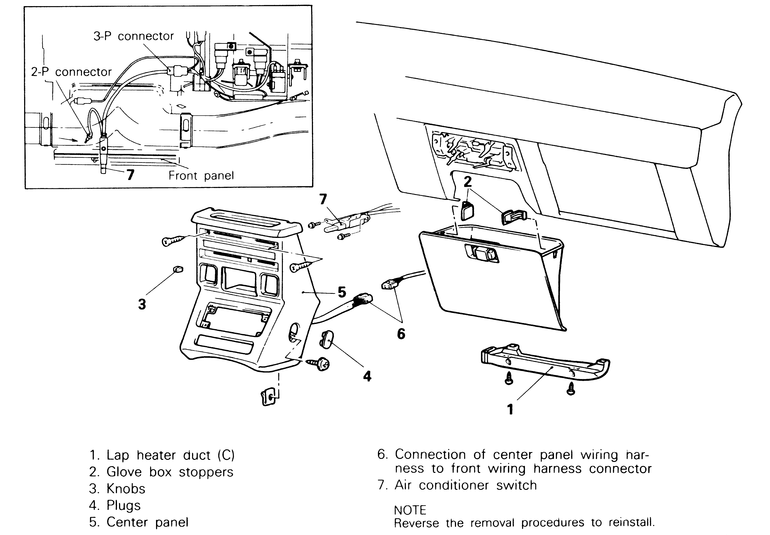
Fig. 2: Air conditioning switch removal and installation
components — 1983–91 Monteros
Unscrew the two air conditioner mounting screws and draw the A/C switch
and its wire out the front. It may be necessary to loosen the screws holding
the heater control panel in place so that the panel can be lifted slightly
to allow the switch to be removed easier.
To install the switch, feed its wire through the switch's mounting hole
just below the heater control panel.
Secure the switch in place with the two mounting screws, then plug the A/C
switch wire connector back together.
Plug the center panel wiring harness connector and the front wiring harness
connector back together.
Place the center panel in position and affix it there with the retaining
screws.
Push the retaining screw covers back in place.
Install the glove box assembly and install the glove box stopper in place.
Push all of the heater control panel knobs back onto their respective levers.
Position the lap heater duct in place and secure it there with the screws.
Connect the negative (-) battery cable back to the battery.