Previous Next

TESTING

System Operation
  1. Switch the MAIN switch to On.
  2. Drive above a speed of 25 mph (40 km/h).
  3. Press the SET button.
  4. Check and make certain that the speed is not only the same speed as when the button was released, but that the speed stays constant.

    NOTE: If, because of climbing a hill for example, the vehicle speed decreases to approximately 12 mph (20 km/h) below the set speed, (9 mph or 15 km/h for 1992–95 Monteros), the cruise control will cancel.

Speed Increase
  1. Set to the desired speed.
  2. Turn the control switch to the RESUME position.
  3. Check to be sure that acceleration continues while the switch is held, and that when it is released the constant speed at the time becomes the driving speed.

    NOTE: Even if, during acceleration, the vehicle speed reaches or exceeds the high limit of approximately 90 mph/145 km/h (124 mph or 200 km/h for 1992–95 Monteros), acceleration will continue; however, when the switch is released, the set speed (memorized speed) will slow to the high limit of the vehicle speed.

Speed Reduction
  1. Set the vehicle to the desired speed.
  2. Turn the control switch to the SET position (push the SET button in on older models).
  3. Check that the deceleration continues while the switch is pressed, and that when it is released the constant speed at the time when it was released becomes the new driving speed.

    NOTE: When the vehicle speed reaches the low limit (approximately 25 mph or 40 km/h) during deceleration, the cruise control will cancel.

Cancellation and Resume
  1. Set the cruise speed control.
  2. Check that there is a return to ordinary driving (cruise control is cancelled) when either of the operations below is performed.
  3. Turn the control switch to the RESUME position while driving at a vehicle speed of approximately 25 mph (40 km/h) or higher, and check that there is a return to the cruise control speed before it was cancelled. The vehicle should also maintain this speed.
  4. When driving at a constant speed and the main switch is turned OFF, check that the vehicle returns to normal driving conditions.
Switch Continuity
PICK-UP
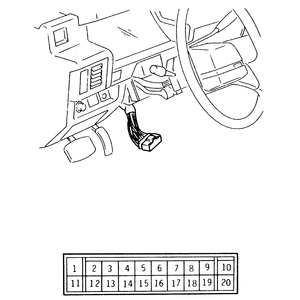
  1. Unplug the column switch harness connector.
  2. Operate the switch and check the continuity between the switch-side terminals.
  3. If the switch does not show the correct continuity, the switch needs replacement with a new switch.

    Fig. 1: Control switch-side harness connector terminal configuration — 1988–95 Pick-ups

Previous Next