Previous Next

REMOVAL & INSTALLATION

  1. Disconnect the negative (-) battery cable from the battery.
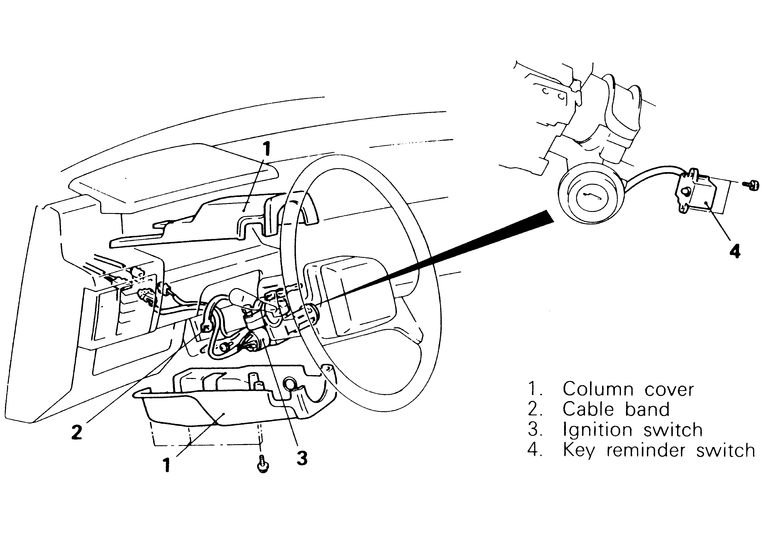
  2. On 1992–95 Monteros, remove the instrument under cover.
  3. Remove the upper and lower column covers.
  4. Trace the ignition wires back to their connectors. Reach in through the steering column hole and undo the ignition wire connectors.
  5. Remove any retaining straps along the ignition wires.
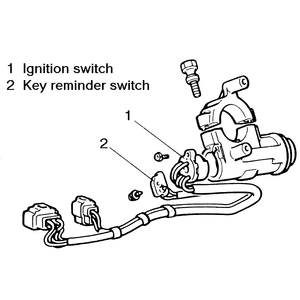
  6. Loosen and remove the two screws holding the ignition switch clamp on the steering column. Remove the ignition switch from the column.
  7. Unscrew the screws holding the key reminder switch to the ignition switch housing and remove it.

    Fig. 1: The ignition switch assembly is, except for a few minor additions, essentially the same for all Monteros and Pick-ups

    Fig. 2: The procedure for removing and installing the ignition switch is the basically same for all Monteros and Pick-up trucks

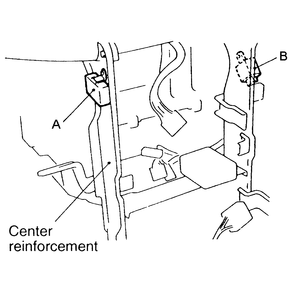
    Fig. 3: The 1992–95 Monteros have a buzzer (A) and a key hole illumination timer (B) mounted to the center reinforcements

  8. To install, screw the key reminder switch back onto the ignition switch housing.
  9. Place the ignition switch in the correct position on the steering column and secure it there with the two mounting screws.
  10. Route the wiring back through the steering column hole and plug the connectors back together.
  11. Secure the ignition wires to the steering column with new wire straps.
  12. Install the upper and lower column covers.
  13. On 1992–95 Monteros, install the instrument under cover.
  14. Connect the battery cable back to the battery.

Previous Next