Nissan GT-R (R35) · Service Manual DRIVER INFORMATION & MULTIMEDIA

COMBINATION METER

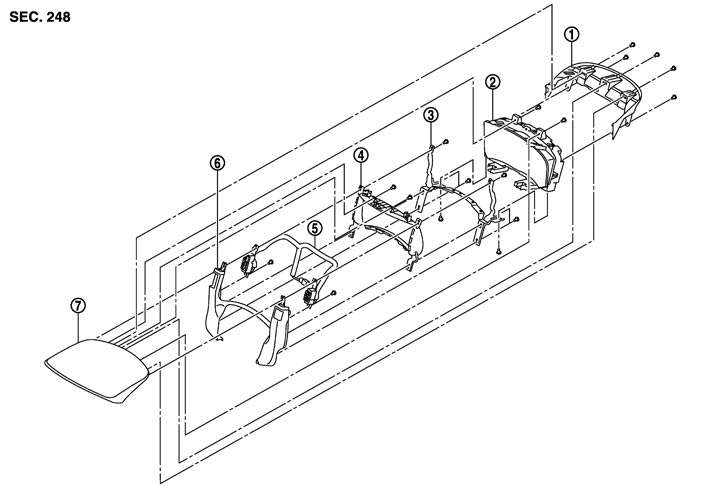
Exploded View

 
 REMOVAL
 
 Cluster Lid A

Refer to Exploded View.
 
 Combination Meter


NNNIA0085ZZ.JPG

1.
Cluster lid A rear cover
2.
Combination meter
3.
Bracket
4.
Meter housing
5.
Meter control switch
6.
Cluster lid A under cover
7.
Cluster lid A front cover


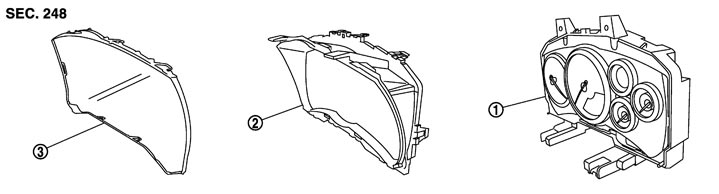
 DISASSEMBLY


NNNIA0012ZZ.JPG

1.
Meter control unit assembly
2.
Upper housing
3.
Front cover

Removal and Installation

 
 REMOVAL

    1.Remove the cluster lid A from the vehicle. Refer to Removal and Installation.

    2.Remove the meter control switch connector (1) from the combination meter (2).
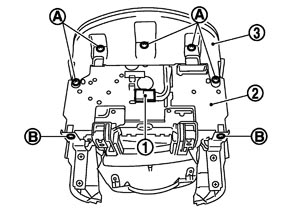
    NNNIA0011ZZ.JPG
    3.Remove the screws (A), and then remove the cluster lid A rear cover (3).
    4.Remove screws (B).

    5.Remove the screws (A), and then remove the combination meter (1).
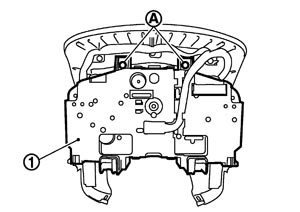
NNNIA0107ZZ.JPG
 
 INSTALLATION

Install in the reverse order of removal.

Disassembly and Assembly

 
 DISASSEMBLY

  1. Remove the tabs, and then remove the upper housing.
  2. Remove the tabs, and then remove the front cover.
 
 ASSEMBLY

Assemble the reverse order of disassembly.