SIDE AIR BAG (SATELLITE) SENSOR
Exploded View
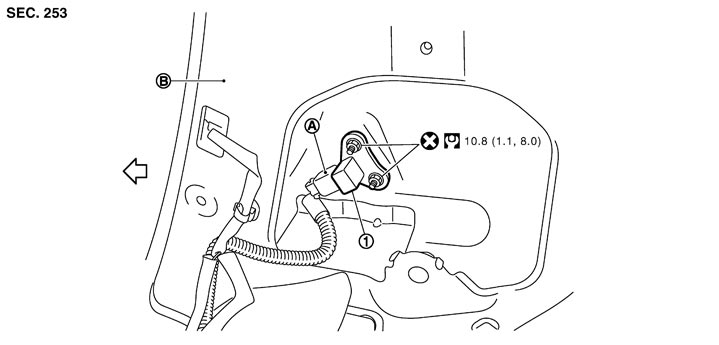
|
1. |
Satellite sensor |
|
|
|
|
|
A. |
Satellite sensor harness connector |
B. |
Center pillar inner panel |
|
|

|
: Vehicle front |
|
|
|
|
|
Refer to Components for symbols in the figure. |
|||||
Removal and Installation
■ WARNING ■
- Before servicing, turn ignition switch OFF, disconnect battery negative terminal and wait at least 3 minutes.
- Never use the air tools or electric tools for servicing.
 REMOVAL
- 1.Remove the front seat belt retractor. Refer to Removal and Installation.
- 2.Disconnect the satellite sensor harness connector.
- 3.Remove the satellite sensor mounting nut, and then remove the satellite sensor.
■ CAUTION ■
- Never impact the side air bag (satellite) sensor.

- Replace the side air bag (satellite) sensor if it is dropped or sustains an impact.
- Replace the side air bag (satellite) sensor of deployed SRS front side air bag and deployed SRS side curtain air bag.
INSTALLATIONInstall in the reverse order of removal.
■ CAUTION ■
- Never use the old fixing nuts after removal, replace with the new nuts.
- If malfunction is detected by the air bag warning lamp, after repair or replacement of the malfunctioning parts, reset the memory using self-diagnosis or CONSULT-III. Refer to Diagnosis Description.
- After the work is complete, check that no system malfunction is detected by air bag warning lamp.