INTELLIGENT KEY
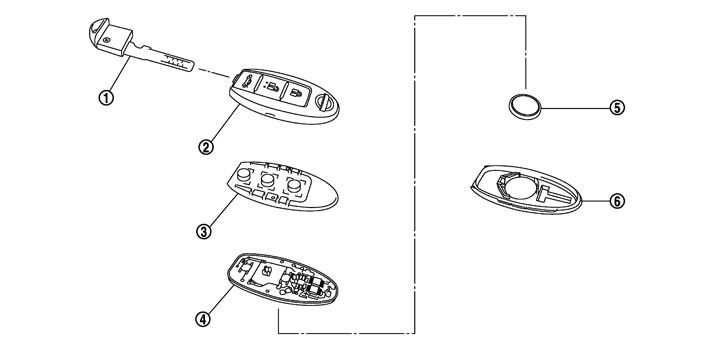
|
1. |
Mechanical key |
2. |
Upper case |
3. |
Switch rubber |
|
4. |
Circuit board |
5. |
Battery |
6. |
Lower case |
- 1.Unlock the lock knob on the rear of Intelligent Key, and then remove the mechanical key.
- 2.Insert a screwdriver wrapped with tape into Area A and then separate lower and upper cases by twisting screwdriver.
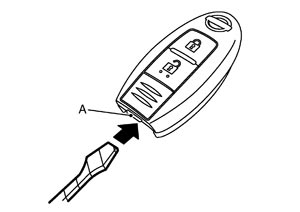
- 3.When replacing the battery with new oneRemove the battery from the lower half of the case and replace it.
| Battery replacement | :Coin-shaped lithium battery 3 V (CR2032) |
■ CAUTION ■
Keep dirt, grease, and other foreign matter off the electrode contact area when replacing battery.- 4.Remove circuit board assembly from upper case. (Substrate assembly: circuit board + switch rubber)
- 5.When replacing the circuit board or switch rubberGently press the switch rubber and remove the circuit board.
■ CAUTION ■
Never touch the printed circuits directly.- 6.After replacement, assemble the upper and lower cases by engaging the hooks on their circumference while being careful not to pinch the switch rubber, etc.
- After replacing the battery, check that all Intelligent Key functions work normally.
■ CAUTION ■