REFRIGERANT PRESSURE SENSOR
AUTOMATIC AIR CONDITIONER
Exploded View
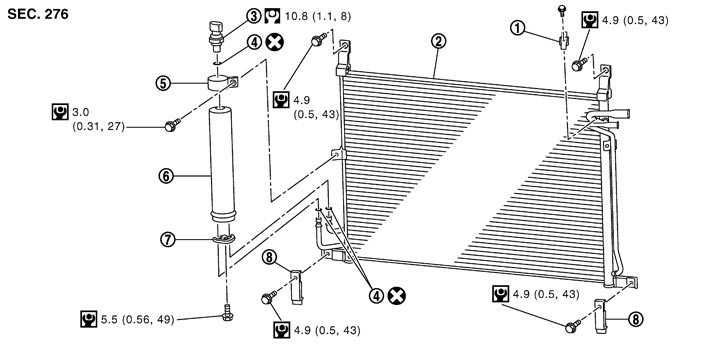
|
1. |
Clip |
2. |
Condenser |
3. |
Refrigerant pressure sensor |
|
4. |
O‐ring |
5. |
Liquid tank bracket |
6. |
Liquid tank |
|
7. |
Bracket |
8. |
Condenser lower bracket |
|
|
|
Refer to Components for symbols in the figure. |
|||||
Removal and Installation
 REMOVAL
- 1.Remove liquid tank. Refer to Exploded View (GT-R certified NISSAN dealer).
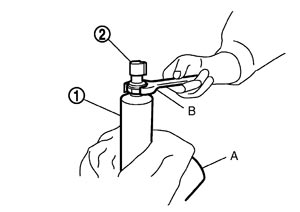
- 2.Fix the liquid tank (1) with a vise (A). Remove the refrigerant pressure sensor (2) with a wrench (B).
■ CAUTION ■
Be careful not to damage liquid tank. INSTALLATIONInstallation is basically the reverse order of removal.
■ CAUTION ■
- Replace O-ring with new one. Then apply compressor oil to them when installing.
- Check for leakages when recharging refrigerant.