DISC ROTOR
REAR DISC BRAKE
 INSPECTION
 Appearance
- If the drilled hole of disc rotor is clogged by the brake pad wear particles, clean the dust with a brush or a vacuum dust collector.
- Check the following item, and then replace the brake pad together with the disc rotor and replace the brake pads of all wheels as a set.
- The surface of the disc rotor for over burnt, uneven wear, cracks, serious damage, peel-off, remarkable groove or vertical streaks.
- The floating pin and nut for wear or damage.
- Any different groove in 0.5 mm (0.020 in) for disc rotor with brake noise.
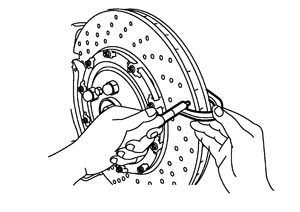
ThicknessCheck the thickness of the disc rotor using a micrometer. Replace the disc rotor if the thickness is below the wear limit.
■ CAUTION ■
- Replace the disc rotor and brake pad as a set.
- Replace all wheels as a set.
| Limit | |
| Wear thickness | : Refer to Front Disc Brake. |
ADJUSTMENTPerform the following procedure when replacing the brake pad and disc rotor.
■ CAUTION ■
- Be careful of the vehicle speed, because the effectiveness of the brake is decreased by the anti-corrosion paint (silver color) applied for the contact surface with the brake pad for new disc rotor.
- Perform the procedure only on a safe road and be careful of the traffic conditions.
- 1.Drive on flat straight roads.
- 2.Depress the brake pedal to stop the vehicle within 3 to 5 seconds.
- 3.Cool the brake.
- 4.Repeat the above steps 1 to 3 until the operational feeling of brake pedal becomes equal to the pre-operation condition.
- 5.Check that the anti-corrosion paint (silver color) of disc rotor is eliminated. If the anti-corrosion paint (silver color) remains, repeat the above steps 1 to 3.
- 6.If brake noise occurs, loosen the caliper mounting bolts after checking that the anti-corrosion paint (silver color) does not remain at the disc rotor, and then perform the caliper position adjustment by tightening to the specified torque. Refer to Removal and Installation (GT-R certified NISSAN dealer).
- 7.Use a brake tester to check that it is within the normal range.