 |
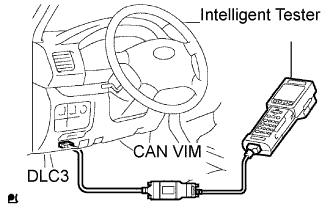
Connect the intelligent tester to the DLC3.
Turn the ignition switch ON.
Turn the tester ON.
Enter the following menus: DIAGNOSIS / ENHANCED OBD II / DTC INFO / CURRENT CODES.
Check the DTC(s) and freeze frame data, and then write them down.
Check the details of the DTC(s) (Click here).
- NOTICE:
- When simulating a symptom with the OBD II scan tool (excluding intelligent tester) to check the DTCs, use the normal mode. For DTCs subject to "2 trip detection logic", perform either of the following actions.
- Turn the ignition switch to OFF after the symptom is simulated once. Then repeat the simulation process again. When the problem has been simulated again, the MIL illuminates and the DTCs are recorded in the ECM.
- Check the pending fault code using the Continuous Test Results function (Mode 7 for SAE J1979) on the OBD II scan tool.