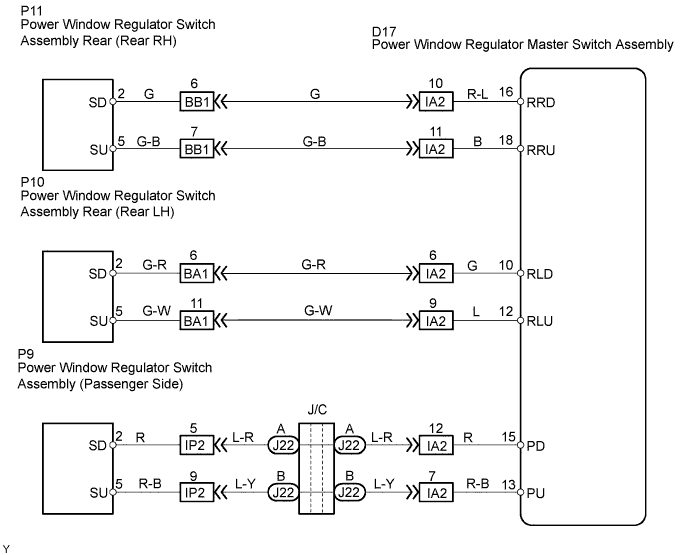
POWER WINDOW CONTROL SYSTEM > Remote Up / Down Function does not Operate |
| 1.CHECK AUTO DOWN FUNCTION |
Check that the AUTO UP/DOWN function operates normally.
|
| ||||
| OK | |
 |
| 2.CHECK POWER WINDOW LOCK SWITCH |
 |
Push the window lock switch OFF (normal) and check that the remote UP/DOWN function operates.
|
| ||||
| NG | |
|
| 3.CHECK MANUAL UP/DOWN FUNCTION |
Inspect the switch with which the remote function cannot be operated.
|
| ||||
| OK | |
|
| 4.INSPECT POWER WINDOW MASTER SWITCH |
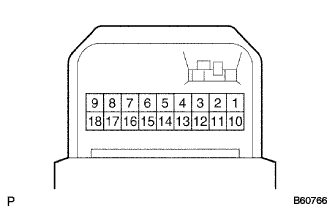 |
Remove the master switch.
Check the continuity between the terminals of the master switch connector when the switch is operated.
| Window Lock Switch | Power Window Switch | Terminal No. | Specified Condition |
| OFF (Normal) | UP | 1 - 15, 6 - 13 | Continuity |
| OFF | 1 - 13 - 15 | ||
| DOWN | 1 - 13, 6 - 15 | ||
| ON (Lock) | UP | 6 - 13 | |
| OFF | 13 - 15 | ||
| DOWN | 6 - 15 |
| Window Lock Switch | Power Window Switch | Terminal No. | Specified Condition |
| OFF (Normal) | UP | 1 - 16, 6 - 18 | Continuity |
| OFF | 1 - 6 - 18 | ||
| DOWN | 1 - 18, 6 - 16 | ||
| ON (Lock) | UP | 6 - 18 | |
| OFF | 16 - 18 | ||
| DOWN | 6 - 16 |
| Window Lock Switch | Power Window Switch | Terminal No. | Specified Condition |
| OFF (Normal) | UP | 1 - 10, 6 - 12 | Continuity |
| OFF | 1 - 10 - 12 | ||
| DOWN | 1 - 12, 6 - 10 | ||
| ON (Lock) | UP | 6 - 12 | |
| OFF | 10 - 12 | ||
| DOWN | 6 - 10 |
|
| ||||
| OK | ||
 | ||
| ||
