 |
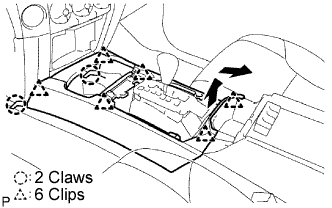
Disengage the 6 clips and 2 claws, and then remove the upper console panel sub-assembly.
- NOTICE:
- Be careful not to snap the claws during the operation.
VIDEO TERMINAL > REMOVAL |
| 1. REMOVE CONSOLE PANEL SUB-ASSEMBLY UPPER |
|
Disengage the 6 clips and 2 claws, and then remove the upper console panel sub-assembly.
| 2. REMOVE VIDEO TERMINAL |
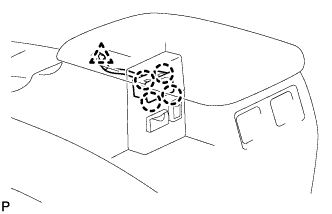 |
Disconnect the connector.
Disengage the wire harness clamp.
Disengage the 4 claws and remove the video (video adapter) terminal.