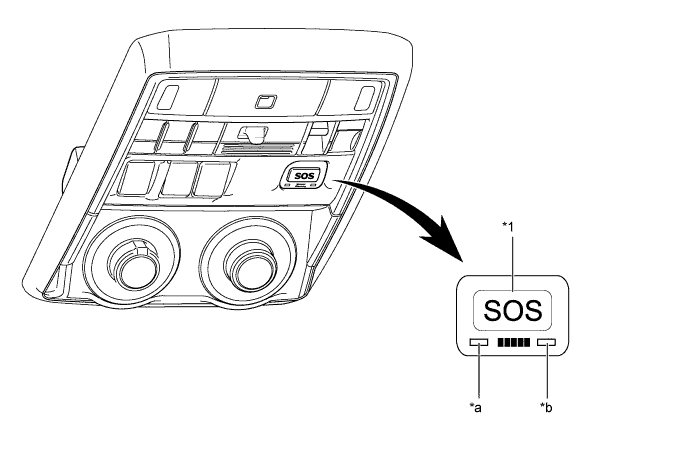
Automatic Collision Notification Service
In the event of an accident in which any of the airbags is deployed or a severe collision occurs, upon receiving a deployment signal from the center airbag sensor assembly, the DCM (telematics transceiver) automatically makes an emergency call and transmits the vehicle position and user information to the call center. Then, the line will be automatically connected to the call center and the driver can speak with the call center advisor. If the driver is unable to communicate, the call center advisor will alert the PSAP nearest to the vehicle, explain the situation, and request dispatching emergency services.
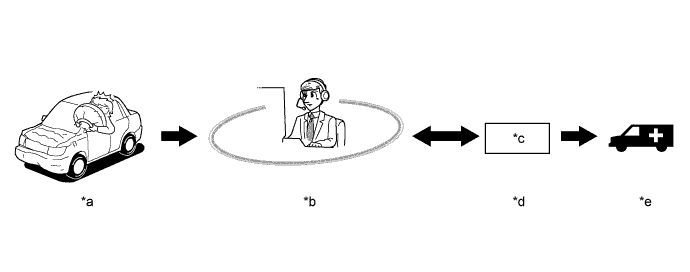
Text in Illustration *a Airbag deployment or collision detection *b Call Center *c Public Safety Answering Point (PSAP) *d 911 Emergency Service *e Calling an Ambulance - -
Emergency Assistance Button (SOS) Service
When the manual (SOS) switch is used in an emergency on a road, a call center advisor will locate the vehicle position, judge the level of an emergency, and then offer emergency services such as PSAP appropriate to the situation.
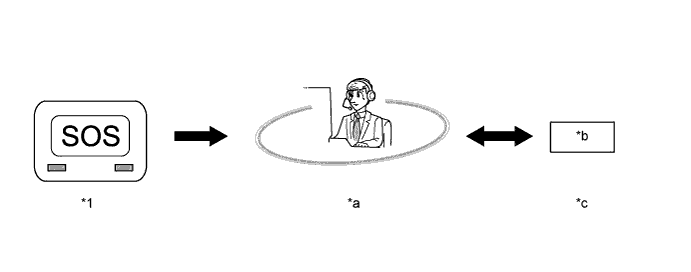
Text in Illustration *1 Manual (SOS) Switch - - *a Call Center *b Public Safety Answering Point (PSAP) *c 911 Emergency Service - -
Stolen Vehicle Location Service
In the event of a vehicle theft, the user has to report the police and then calls the call center. A call center advisor will connect to the stolen vehicle and track the vehicle based on the current vehicle location and speed obtained by the GPS. The call center advisor will also alert the police where required.
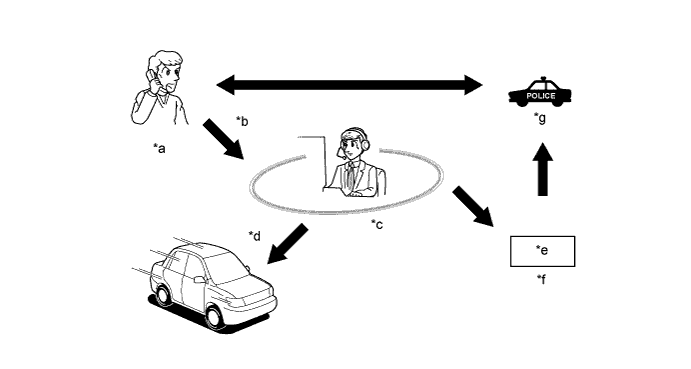
Text in Illustration *a Vehicle stolen *b Reporting *c Call Center *d Track the stolen vehicle *e Public Safety Answering Point (PSAP) *f 911 Emergency Servicer *g Police - -
Safety Connect Mode
There are 3 modes depending on the subscription status and the services vary depending on the mode accordingly.
*1: The services are only available at plants and ports to prevent vehicles from being stolen before delivery to dealers.Subscription Status Mode Type Available Services Before Subscription Shipping Mode*1 ACN Service Stolen Vehicle Location Service After Subscription*2 Active Mode ACN Service Stolen Vehicle Location Service Emergency Assistance Button (SOS) Service After Subscription Cancellation*3 Deactive Mode -
*2: The service becomes available after turning the ignition switch to ON while within a cellphone coverage area in the United States. Even after cancellation of the service, the service will be made available again after pressing the manual (SOS) switch or setting the Techstream. For details about set-up using the Techstream, refer to the Repair Manual.
*3: To cancel the subscription, please contact the call center.
Voice Guidance Function
The following voice messages are played depending on the situation.
Voice Prompt Usage Condition "Safety Connect failure detected, please contact your dealer". When the system detects manual (SOS) switch red Indicator failure. The system repeats this warning once each time the engine switch is turned on (IG) until the problem is fixed. "Connecting to the Call Center". Active Mode "Safety Connect Activation Failed". Deactive Mode "Safety Connect Activation Complete". The DCM (telematics transceiver) activation completes normally. "Please make sure you are in an area with good cellular coverage and try again. If you continue to receive this message, contact your dealer". Follows port activation sequence. "Unable to Connect to the Call Center". The DCM (telematics transceiver) cannot connect, such as Retries are exceeded, or Center is unavailable. "Impact Detected". When the DCM (telematics transceiver) received an air collision detection signal. "Connecting to the Emergency Call Center". Call initiated to call center. "Unable to Connect to the Emergency Call Center". The DCM (telematics transceiver) cannot connect to emergency call center for some reason. "To cancel, please press the button again". If we can cancel emergency call. "Emergency call cancelled". If we can cancel emergency call. "The system will try again". The DCM (telematics transceiver) cannot connect to emergency call center for some reason. "Welcome to Safety Connect". This voice prompt is a short version for activation. "To activate, please press the button again within 5 seconds". This voice prompt is an instruction for activation. "Safety Connect is not initialized". Reserve for activation. "Safety Connect is not active". When the DCM (telematics transceiver) is in Deactive mode. "For information on setting up a new subscription or to initialize a subscription you've already set up, please press the button again within 5 seconds". When the DCM (telematics transceiver) is in Deactive mode.