 |
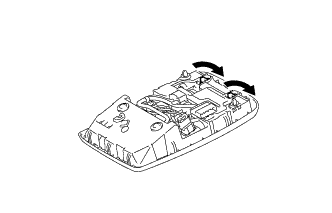
Turn the 2 sockets in the direction indicated by the arrows to install them.
ROOM LIGHT (for Front) > INSTALLATION |
| 1. INSTALL MAP LIGHT BULB |
Install the 2 map light bulbs to the sockets.
|
Turn the 2 sockets in the direction indicated by the arrows to install them.
| 2. INSTALL MAP LIGHT ASSEMBLY |
Connect the connector.
Attach the 2 clips to install the map light assembly.
Install the 2 screws.
Close the cover (w/o Drive Monitor Switch).
| 3. INSTALL DRIVE MONITOR SWITCH (w/ Drive Monitor Switch) |
Connect the connector.
Attach the 4 claws to install the drive monitor switch.