 |
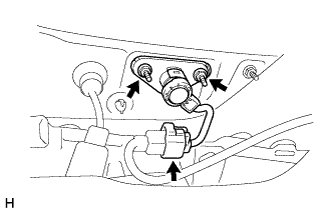
Install the back door lock cylinder with the 2 nuts.
- Torque:
- 5.5 N*m{ 56 kgf*cm , 49 in.*lbf }
TELEVISION CAMERA (for Rear) > INSTALLATION |
| 1. INSTALL NO. 4 BACK DOOR WIRE |
Connect the connector to install the No. 4 back door wire.
| 2. INSTALL REAR TELEVISION CAMERA ASSEMBLY |
Attach the 2 claws to install the rear television camera assembly.
Connect the connector.
Install the 2 screws.
| 3. INSTALL BACK DOOR OUTSIDE GARNISH |
Attach the 3 clips to install the back door outside garnish.
Install the 4 nuts.
Connect the connector.
| 4. INSTALL BACK DOOR LOCK CYLINDER (w/o Smart Key System) |
|
Install the back door lock cylinder with the 2 nuts.
Connect the connector.
| 5. INSTALL NO. 2 BACK DOOR SERVICE HOLE COVER |
Apply butyl tape to the back door panel.
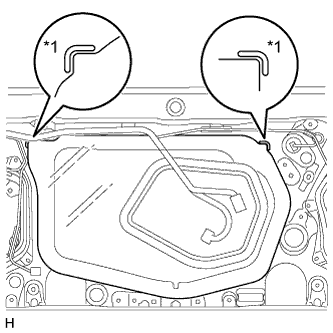 |
Install a new No. 2 back door service hole cover.
| *1 | Reference Point |
Attach the No. 2 back door service hole cover according to the reference points on the back door panel.
| 6. INSTALL MULTIPLEX NETWORK DOOR ECU |
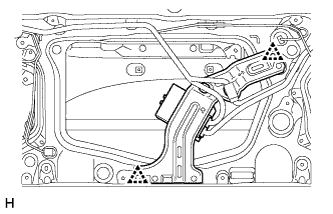 |
Attach the 2 clips to install the multiplex network door ECU to the door panel.
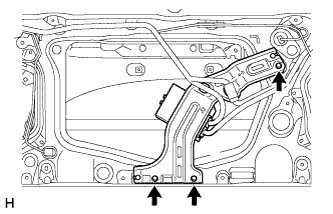 |
Install the 3 screws.
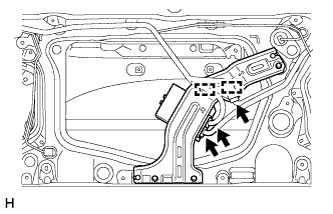 |
Connect the 3 connectors and attach the 2 clamps.
| 7. INSTALL BACK DOOR TRIM PANEL ASSEMBLY |
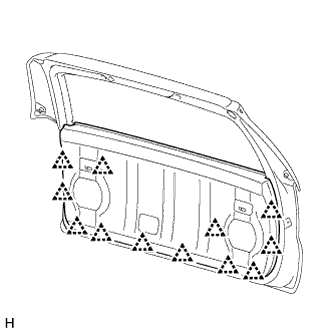 |
Attach the 12 clips to install the back door trim panel assembly.
| 8. INSTALL ASSIST STRAP ASSEMBLY |
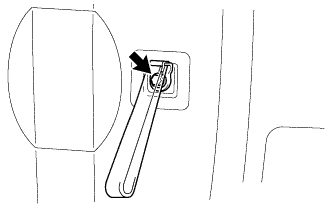 |
Install the assist strap assembly with the bolt.
| 9. INSTALL ASSIST STRAP HOLE COVER |
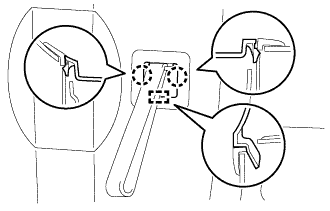 |
Attach the guide and 2 claws to install the assist strap hole cover.