Grip the No. 2 instrument cluster finish panel garnish and pull it diagonally upward toward the rear to detach the 5 clips and remove the No. 2 instrument cluster finish panel garnish.
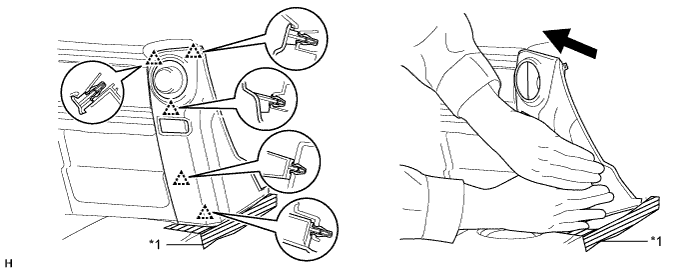
| *1 | Protective Tape | - | - |
SECURITY INDICATOR LIGHT ASSEMBLY > REMOVAL |
| 1. REMOVE NO. 2 INSTRUMENT CLUSTER FINISH PANEL GARNISH |
Open the instrument cluster finish panel lid.
Put protective tape around the No. 2 instrument cluster finish panel garnish.
Grip the No. 2 instrument cluster finish panel garnish and pull it diagonally upward toward the rear to detach the 5 clips and remove the No. 2 instrument cluster finish panel garnish.
| *1 | Protective Tape | - | - |
| 2. REMOVE SECURITY INDICATOR LIGHT ASSEMBLY |
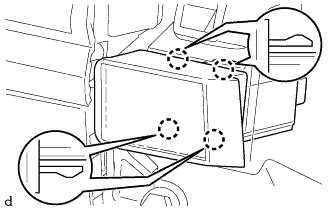 |
Pull the security indicator light assembly to detach the 4 claws on the backside of the security indicator light assembly.
Disconnect the connector to remove the security indicator light assembly.