 |
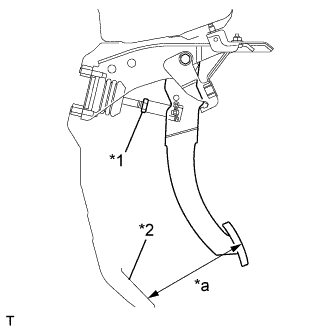
Check the pedal height.
| *1 | Clevis Lock Nut |
| *2 | Floor mat |
| *a | Pedal Height |
| for M/T | 145mm (5.709in.) |
| for A/T | 150mm (5.906in.) |
BRAKE PEDAL (except LHD M/T) > ADJUSTMENT |
| 1. CHECK AND ADJUST BRAKE PEDAL HEIGHT |
|
Check the pedal height.
| *1 | Clevis Lock Nut |
| *2 | Floor mat |
| *a | Pedal Height |
| for M/T | 145mm (5.709in.) |
| for A/T | 150mm (5.906in.) |
Adjust the pedal height.
Remove the instrument panel lower D cover.
Disconnect the connector from the stop light switch.
Remove the stop light switch.
Loosen the push rod clevis lock nut.
Adjust the pedal height by turning the push rod.
| for M/T | 145mm (5.709in.) |
| for A/T | 150mm (5.906in.) |
Tighten the push rod clevis lock nut.
Install the stop light switch.
Connect the connector to the switch.
Check that the stop light does not illuminate when the brake pedal is not stepped.
| 2. CHECK BRAKE PEDAL FREE PLAY |
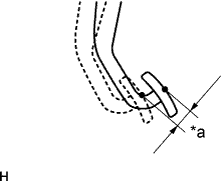 |
Stop the engine. Depress the pedal several times until there is no vacuum in the booster. Then release the pedal.
Depress the pedal until resistance is felt.
Check the pedal free play by measuring the distance between the position in the previous step and the pedal released position.
| *a | Pedal Free Play |
| 3. CHECK BRAKE PEDAL RESERVE DISTANCE |
Release the parking brake pedal. Start the engine, and when the pressure in the brake booster reaches 66.7 kPa (500 mmHg, 19.6 in.Hg), proceed with the next step.
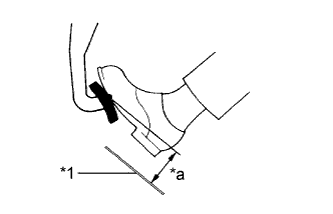 |
Depress the pedal and check the pedal reserve distance.
| *1 | Floor mat |
| *a | Pedal Reserve Distance |