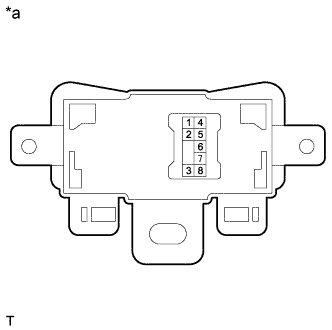
VSC OFF SWITCH > INSPECTION |
| 1. INSPECT PATTERN SELECT SWITCH ASSEMBLY |
Make sure that there is no looseness in the locking part and the connecting part of the VSC OFF switch.
![]() |
Measure the resistance according to the value(s) in the table below.
| *a | Component without harness connected (Pattern Select Switch Assembly) |
| Tester Connection | Check Condition | Specified Condition |
| 5 - 8 | Switch not pushed in | 10 kΩ or higher |
| Switch pushed in | Below 1 Ω |
Make sure that there is no looseness in the locking part and the connecting part of the TRACK switch.
Measure the resistance according to the value(s) in the table below.
| Tester Connection | Check Condition | Specified Condition |
| 1 - 8 | Switch not pushed in | 10 kΩ or higher |
| Switch pushed in | Below 1 Ω |
Check the illumination status
Check the illumination when the battery voltage is applied between the connector terminals.
| Check Condition | Specified Condition |
| Battery positive → 2 Battery negative → 3 | The illumination comes on |