THEFT DETERRENT / KEYLESS ENTRY ENGINE IMMOBILISER SYSTEM DTC CHECK / CLEAR
CHECK DTC (using intelligent tester or Techstream)
Connect the intelligent tester or Techstream to the DLC3.
Turn the ignition switch to ON.
Turn the intelligent tester or Techstream ON.
Enter the following menus: Body / Immobiliser / DTC.
- Body Electrical > Immobiliser > Trouble Codes
- 50001 103
Check for DTCs.
CHECK DTC (not using intelligent tester or Techstream)
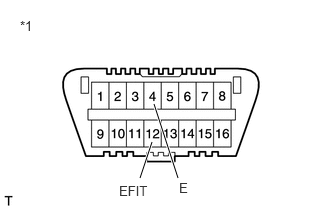
| *1 | DLC3 |
Turn the ignition switch to ON.
Using SST, connect terminals 12 (EFIT) and 4 (E) of the DLC3.
- SST
- 09843-18040
Read DTCs by observing the MIL. If any DTC is not detected, the MIL blinks as shown in the illustration.
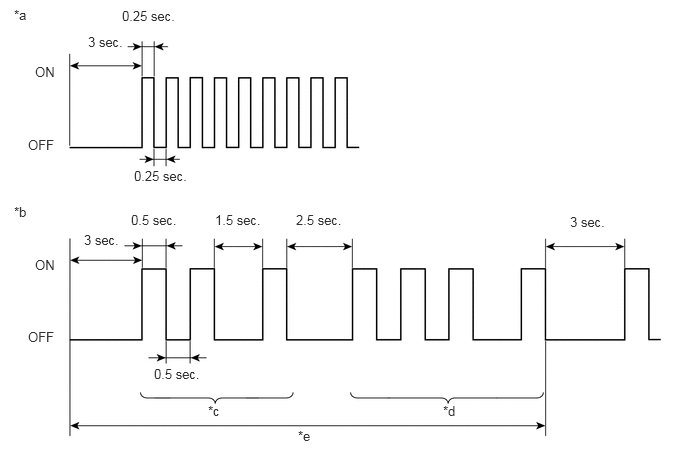
| *a | Normal System Code | *b | Trouble Code (Example Codes 21 and 31) |
| *c | DTC 21 | *d | DTC 31 |
| *e | One Cycle | - | - |
DTCs 21 and 31 are detected and the MIL starts displaying the DTCs, as shown in the illustration. The MIL blinking pattern of DTC 21 will be displayed first.
A 2.5 seconds pause will occur. This pause will occur between the MIL blinking patterns of each DTC.
The MIL blinking pattern of DTC 31 will be displayed.
A 3.0 seconds pause will occur. This pause will occur when the MIL blinking pattern is the last of a string of multiple DTCs.
The MIL will repeat the display of the string of DTCs.
Check the details of the malfunction using the DTC chart.
After completing the check, disconnect terminals 12 (EFIT) and 4 (E) and turn off the display.
- HINT:
-
In the event that 2 or more DTCs are detected, the MIL will indicate the smaller number DTC first.
Confirm the details of the DTCs.
CLEAR DTC (using intelligent tester or Techstream)
Connect the intelligent tester or Techstream to the DLC3.
Turn the ignition switch ON.
Turn the intelligent tester or Techstream ON.
Enter the following menus: Body / Immobiliser / DTC.
- Body Electrical > Immobiliser > Clear DTCs
- 50002 103
CLEAR DTC (Not using intelligent tester or Techstream)
Remove the EFI fuse from the engine room relay block for more than 60 seconds, or disconnect the negative battery cable for more than 60 seconds. When disconnecting the negative battery cable, perform the "INITIALIZE" procedure.